1 Preset
Shows the current preset. An asterisk means the sound has changed since it was loaded. The arrows step through the list. Click the name for the menu: factory presets, your presets, Save, Save As, Rename and Delete.
UNPUBLISHED / Draft for 1.0 / 11 November 2026 / desktop 1.0.0 and iOS 1.0
A stereo, sequenced analog delay that changes pitch the way a bucket-brigade chip does.
Speed up or slow down the clock and every echo already in the line moves with it. Three steps turn those clock changes into melodies, so one note can come back as a tune.
Download the PDF draft01 / MANUAL
Bamboo Drift is a delay built around one idea from old analog hardware. A bucket-brigade chip passes sound along a row of tiny storage cells, one step per tick of a clock. Run the clock faster and the sound reaches the end sooner, so the delay gets shorter and everything in the line plays back higher. Run it slower and the delay grows, the pitch drops, and the chip gets darker, grittier and noisier.
Bamboo Drift moves that clock on purpose. A short sequence, BASE followed by up to three steps, changes the clock in time with your music. When the clock changes, only the notes already in the line shift. Whatever you play next goes in at the new clock and sounds at your own pitch until the next change. That is the signature sound: you play one note and hear it come back as a small melody.
There is no pitch shifter anywhere in Bamboo Drift. Pitch, echo spacing and grit always move together, because they all come from the same clock.
Bamboo Drift runs as an Audio Unit, VST3, AAX and standalone app on the Mac, as a VST3 and standalone app on Windows, and as an app and AUv3 on iPhone and iPad. The controls and sound are the same everywhere. On the desktop it is a full demo until you activate a license; on iOS the delay is free and an in-app unlock opens the sequence. See Setup and troubleshooting, and the iPhone and iPad chapter.
This manual describes Bamboo Drift 1.0. The screenshots come from the 1.0 build on an iPad simulator, unlocked; the desktop face is the same.
To hear the idea in thirty seconds: load the Friendly Fifths preset, put Bamboo Drift on a track, and play a single short note. The first echoes sound at your pitch. When the sequence moves to step 1, the echoes still ringing drop by a fifth. Play another note during step 1 and it comes back a fifth higher when the sequence returns to BASE.
For a first pass of your own: choose Init from the preset menu. Turn Mix to about halfway, Feedback to about 40 %, Chip age to 50 % and Glide to Instant. Switch step 1 on and turn its knob to -5th. Play short notes and listen to each echo change as the step changes. Then switch step 3 on and try -oct.
02 / MANUAL
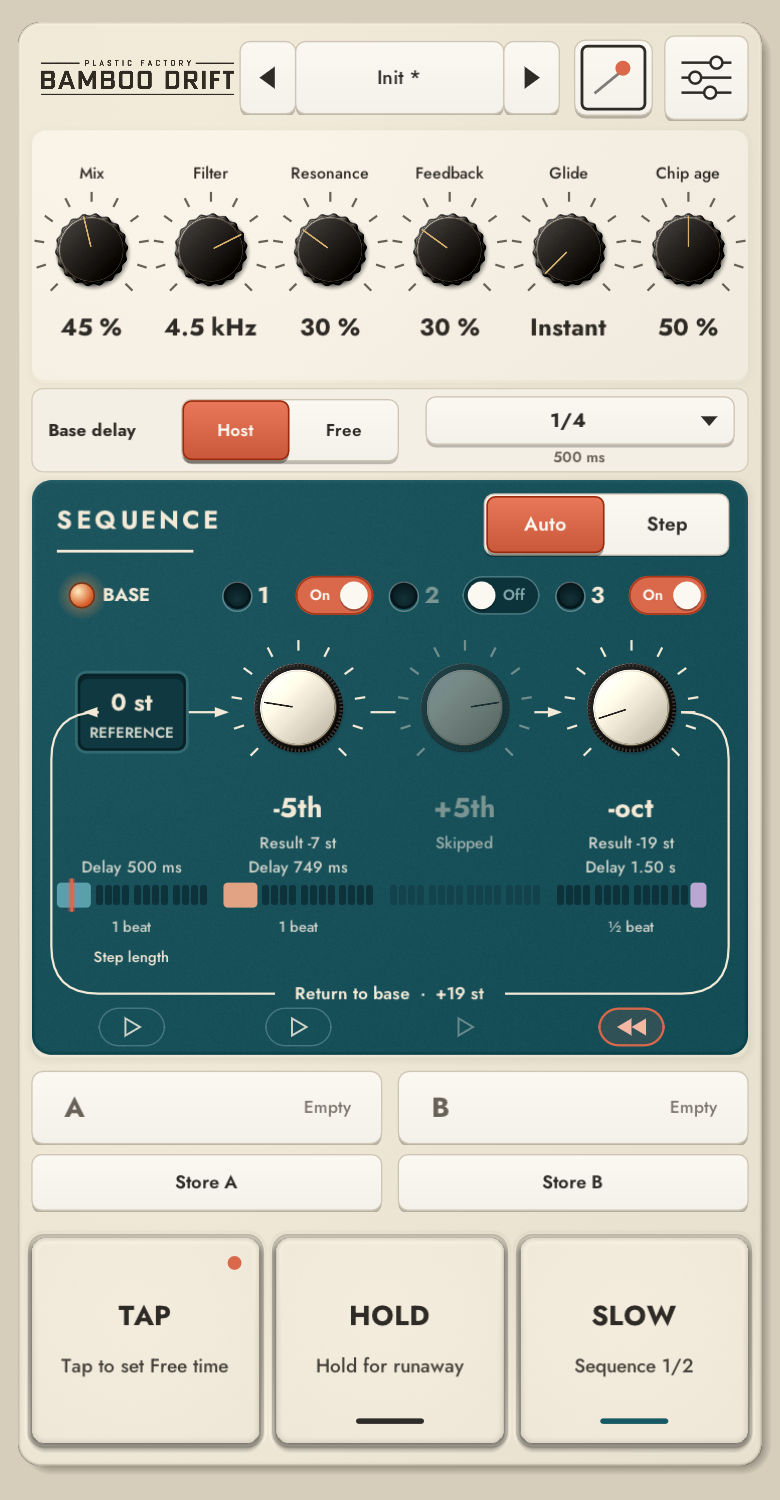
Main is where you set the delay and its sequence. The numbered controls below refer to this view. The six knobs at the top also appear on the Perform view and do the same thing there.
The header across the top is shared by all three views. The preset field and the view tabs are numbered here only.
The view is shown with steps 1 and 3 on, step 2 skipped, and step 3 reversed. On the iPhone and the folded faces the direction switches sit under the Return to base line instead of beside the On switches.
Shows the current preset. An asterisk means the sound has changed since it was loaded. The arrows step through the list. Click the name for the menu: factory presets, your presets, Save, Save As, Rename and Delete.
Switch between the three views. Switching never changes the sound. Anything you were holding or had latched on the Perform view is released when you leave it.
Blends the dry input with the echoes, with an equal-power curve. The default is 45 %. The dry path is never filtered, driven or delayed.
The cutoff of the low-pass filter inside the feedback loop, from 300 Hz to 12 kHz. Because it sits in the loop, each repeat passes through it again and grows darker than the one before.
The filter's peak. The loop filter is a Scream design in the style of the MS-20, with a diode-clipped resonance. Higher settings make the repeats ring at the cutoff and can sing on their own at the top.
How much of each echo goes back into the line. Most of the travel gives echoes that fade away. The top of the knob, from about 93 %, crosses into self-oscillation: the line keeps sounding on its own and builds into runaway. Output is held under a safe ceiling.
How long a step change takes, from Instant to 4 seconds. With glide, the clock slides between steps, so the echoes in the line bend smoothly to their new pitch instead of jumping.
The condition of the chip. At 0 % it is clean. Noise and clock whine come in slowly up to the default of 50 %. Above 50 % the chip loses headroom and detail with every transfer. From 90 % it is a damaged chip, with clock grit, flutter and dropouts inside the loop.
Host locks the base delay and the sequence to the host tempo. Free sets the base delay in milliseconds and runs the sequence from it. Tapping TAP switches to Free.
In Host, a note value from 1/16 to 1/1, with the time it gives at the current tempo beside it. In Free, drag up or down to set 20 ms to 2 seconds. This is the only delay time you set; every step's delay comes from it.
Auto runs the sequence in time. Step holds each step until you advance it by hand with STEP, NEXT, the Next Step parameter or a MIDI note.
Each of steps 1, 2 and 3 has a switch, the left half of its capsule. An off step is skipped, along with its interval, and its column dims. BASE is always on.
The right half of the capsule: a quiet arrow plays the step forward, a coral rewind plays it in reverse. A reversed step plays its echoes backwards at the same pitch; see Building a sequence.
How far this step moves the pitch from the step before it: -2 oct, -oct, -5th, -4th, -2nd, 0, +2nd, +4th, +5th, +oct or +2 oct. Down means a longer, darker delay; up means a shorter, brighter one. Under the knob, Result is the total shift from BASE and Delay is the delay this step plays at.
The lit lamp shows the step that is playing.
The reference step. It always plays at 0 st and at the base delay. Every sequence starts here and returns here.
BASE's own direction pill. BASE reversed plays the reference echoes backwards; the Return to base line then shows the rewind.
How long the step lasts, drawn as one bar of music. The filled block is the step's length; the caption gives it in beats. Click or tap the bar to choose from 1/32 to two bars. A coral line runs through the block while the step plays. A reversed step's bar fills from the right and its line runs backwards.
The shift you hear when the sequence jumps back to BASE. You never set it. It is the steps' total, turned around: after -7 and -12 it reads +19 st.
In Auto, tap twice or more to set the Free time from the gap between your last two taps; a pause over 2.5 seconds starts a new pair. In Step mode the pad reads STEP and advances one step per press. The dot blinks on the beat.
Two snapshots of the whole sound. Click the letter to recall it exactly, step switches and directions included. The slot reads Playing while the live sound matches it.
Copies the live sound into the slot, replacing what was there. Stored in A confirms it for a moment.
Sync, base delay and sequence mode at a glance, plus the slot letter while a snapshot is playing. It appears at the foot of all three views.
03 / MANUAL
Perform is for playing the delay by hand. Nothing on this view writes the knobs. Let go and the sound returns exactly to the face, and the preset is not marked as changed. The only exception is SET, which copies the dub pad into the Filter and Feedback knobs on purpose.
The knob row stays at the top, so the sound settings are always in reach. The view is shown with SLOW latched, THROW on and a move loop of dub-pad moves playing. The LOOP strip under A and B records what you do on this view and plays it back in time; see The move loop.
The sequence in one row: each step's lamp and total shift, with the playing step outlined. Skipped steps read off.
The same switch as on Main.
Drag to take over Filter (left to right, 300 Hz to 12 kHz) and Feedback (bottom to top). Touch-down jumps to your finger. Let go and the sound glides home to the knobs over a quarter of a second. The dashed ring marks home.
Below the striped band the pad tops out at a feedback that still fades. Inside it, feedback climbs into runaway; the top edge equals HOLD.
The pad's filter and feedback, in coral while you play it, or the knob values, dimmed, at rest. In the band it reads Runaway.
When on, the pad keeps its position after you lift. Tap to move the point. Turn Latch off, or tap with two fingers on iOS, to let it glide home.
Writes the pad's position into the Filter and Feedback knobs and releases the pad, with no jump in sound. The host records it as a normal knob move. It is dimmed in the runaway band.
Bends the clock up to 24 semitones either way on top of whatever step is playing. Up is higher and shorter. It follows your finger over 60 ms and returns home in 20 ms when you let go.
The current bend in semitones, in coral while bending.
Snap on rounds the bend to the interval set: 0, 2, 5, 7, 12 and 24 semitones either way. Snap off bends continuously.
Holds the bend when you lift. Tap the 0 mark, or turn Latch off, to release it.
Recall-only versions of the snapshot slots, so a snapshot can't be overwritten mid-performance. Store on the Main view.
Tap to arm a take: REC blinks until your first move, then records for the loop's length. Tap while the loop plays to overdub; it reads DUB. Hold to clear the loop. Two-finger tap, Command-click or Ctrl-click undoes the last take; right-click offers Clear and Undo.
Starts and stops the loop; it reads STOP while the loop plays. The bar beneath shows where the loop is in its length.
The loop's length: tap to cycle 1, 2, 4 and 8 bars. It changes only an empty loop. In Free it also shows the length in seconds.
While the loop plays, a hollow dot and trail show where the loop has the dub pad. Touch the pad to take it over; let go and the loop takes it back.
While held, the line feeds itself into a bounded runaway. Release and it falls back to the Feedback knob within 50 ms.
Click to latch. Every step lasts twice as long; the delay time does not change. The length bars keep showing the setting.
Hold to dump the echoes. The wet sound and the loop go silent at once and the line is emptied. When you let go, only what you play next echoes.
Turns on dub throws. While it is on, nothing new enters the line except while you touch the dub pad or hold CATCH; the echoes already in it ring out.
With THROW on, hold to open the line to what you play without moving the dub pad. Without THROW it is dimmed and does nothing.
Advances one step. Lit in Step mode or MIDI Step; dimmed otherwise.
04 / MANUAL
Advanced holds the settings you change less often: how the intervals behave, the filter, ducking, drive, stereo, the two kinds of motion, MIDI and output. On iPhone and in small windows the same controls are under the hood; see the iPhone and iPad chapter. The view is shown with Movement lane 1 on Interval 3 and lane 2 on Cutoff.
Musical gives the interval knobs their eleven detents. Continuous makes them smooth from -24 to +24 semitones. Each setting keeps its own knob positions, so you can switch back.
The loop filter as a pair: Cutoff is the same control as Filter on the knob row, and Resonance the same as Resonance there.
Dips the echoes while you play and lets them swell back in the gaps, by up to 20 dB at 100 %. The loop is untouched, so the tails return intact.
Gain into the line, from -12 to +12 dB. More drive pushes the chip and its compander harder. It does not change the dry sound.
Spreads the echoes. At 0 % the two channels behave as one mono chip. Width never changes pitch, and the mono sum stays close to the 0 % sound.
Dual gives each channel its own line on one shared clock. Ping-pong sends the input to the left and bounces each echo to the other side.
The rate of the wobble, from 0.05 to 12 Hz. Wobble moves the delay time, so you hear it as pitch.
How far the wobble moves, up to a semitone either way. At 0 % the wobble is off.
Sine, triangle, square, sample and hold, saw up or saw down. Sample and hold picks a new random level every cycle.
Steady repeats the shape. Twitchy roughens the second half of each cycle; Abrupt replaces it with a few random levels. The first half always follows the shape.
Two lanes, each an LFO that moves one control. The lamp lights while the lane has a target.
The control the lane moves: Mix, Cutoff, Feedback, Glide, Interval 1, Interval 2, Interval 3, Width or Chip age. Cutoff is the Filter knob. None switches the lane off.
The lane's speed, from 0.02 to 8 Hz. It runs freely and does not follow the host tempo.
How far the lane sweeps from the knob's position. Positive depth sweeps up from the knob, negative sweeps down. The knob itself never moves; a coral dot shows where the lane has taken it.
The lane's waveform, from the same six shapes as Wobble.
Play lets a held note set the pitch. Step lets notes advance and choose steps. See the MIDI chapter.
The note that means no shift. The default is C3 (MIDI note 60).
The level of the whole output, dry and wet, from -24 to +6 dB.
Off bypasses the effect: the dry signal passes at full level and nothing new enters the line. This is the same switch as the host's bypass.
On lets the echoes already in the line ring out when the effect is switched off. Off silences them within 20 ms.
05 / MANUAL
Input splits in two. The dry branch goes straight to the output mix with nothing in its way: no filter, drive or delay. Bamboo Drift adds no latency.
The wet branch goes through Drive into the line. Inside the line, the chip, the Filter and Resonance and the Feedback loop work together on every repeat. Chip age shapes the chip itself. Width adds a spread to the echoes, and Ducking lowers them while you play.
Mix blends the two branches with an equal-power curve: at 50 %, each branch is at about 71 % of its full level, so the total loudness stays steady as you turn it. Output Level sets the final level of both.
Because Drive only reaches the line, Mix at 0 % gives you exactly your input back. On a send, set Mix to 100 % and control the amount with the send level.
06 / MANUAL
Think of the line as a conveyor. Sound is written onto it at one end and read off at the other. The clock sets the belt's speed. Bamboo Drift's delay is always the number of stages divided by the clock's rate.
When a step changes the clock, everything already on the belt is read at the new speed. Read faster, it plays higher and arrives sooner. Read slower, it plays lower and arrives later. A step of -12 doubles the delay and drops what is in the line an octave. A step of -7 stretches the delay about one and a half times and lowers it a fifth.
What you play after the change is written at the new speed and read at the same speed, so it comes back at your pitch. It shifts only when the clock changes again. When the sequence returns to BASE, notes you played during a step come back shifted the other way: play during a -7 step and the return lifts that note by a fifth.
With Feedback, echoes go back into the line at the clock in force at that moment, so a long tail can collect several shifts. That is why high feedback with a sequence turns one note into a climbing or falling run.
Lower clocks are darker, grittier and noisier, as on the real chip. Higher clocks are cleaner and tighter. The delay can reach from 5 ms to 32 seconds; past either end it holds at the limit, as a real chip would.
The Glide knob, the bend ribbon, Wobble, Movement lanes on the intervals and MIDI Play all move the same clock, so they all behave this way.
07 / MANUAL
A sequence is BASE followed by steps 1, 2 and 3. It always starts at BASE. Each step's interval is measured from the step before it, so the steps stack: step 1 at -5th and step 3 at -oct gives a result of -19 st on step 3. The sequence then jumps back to BASE, and Return to base shows that jump.
Switch a step off to skip it. Its interval is skipped with it, so the next step counts from the last step that plays. An interval of 0 is a real step: it holds the pitch for its length, which is useful for rhythm.
Each column reads its interval large, then Result (the total from BASE) and Delay (the delay it plays at). A step's delay is the base delay multiplied by its total shift: one octave down doubles it, one octave up halves it.
Step lengths set how long each step lasts, not the delay time. They run from 1/32 to two bars. The whole cycle is the sum of the lengths of the steps that are on. A cycle that isn't a whole number of bars drifts across the bar on purpose, as on the pedal that inspired it, and still plays back the same way every time.
With Host sync, a beat is one quarter note of the host tempo. In Free, a beat is the Free time, so the step lengths scale with the delay time.
Auto runs the steps in time. Step holds the current step until you advance it, from the STEP pad on Main, NEXT on Perform, the Next Step parameter, or MIDI. Advancing skips off steps. Glide applies to every change.
SLOW doubles every step's length while leaving the delay time alone. Use it to stretch a sequence for a breakdown, then release it to snap back.
Each step, BASE included, plays forward or in reverse. A reversed step plays the echoes it would have played backwards in time, at the same pitch, so the melody stays and the articulation flips: plucks become swells. Only the echoes you hear are reversed; the feedback loop runs forward, so a reversed step never changes what later steps hear. A step no longer than its delay reverses in one piece; a longer one plays as back-to-back reversed windows, each one delay long. In Step mode and MIDI Play, where a step has no known end, each window is one delay long. A step switched off keeps its direction for when it comes back on.
| Step length | Beats | Step length | Beats |
|---|---|---|---|
| 2/1 | 8 (two bars) | 1/8. | 3/4 |
| 1/1 | 4 (one bar) | 1/4T | 2/3 |
| 1/2. | 3 | 1/8 | 1/2 |
| 1/2 | 2 | 1/8T | 1/3 |
| 1/4. | 1 1/2 | 1/16 | 1/4 |
| 1/4 | 1 | 1/16T | 1/6 |
| 1/32 | 1/8 |
08 / MANUAL
A and B are two snapshots of the whole sound. Store copies the live sound into a slot; tapping the letter recalls it exactly, with its step switches and directions. Snapshots are saved with your session. Presets don't store them, and loading a preset leaves A and B as they are. Sync, MIDI settings, Keep echo tails, Output Level and the bypass switch are not part of a snapshot. A recall is a jump, not a morph.
Snapshots leave anything you are doing on the Perform view alone. A bend held through a recall keeps bending the new sound, and a playing move loop keeps playing over it.
09 / MANUAL
Use two hands. Each control on the Perform view follows its own finger, so you can bend with one hand and work the dub pad, CHOKE or CATCH with the other.
A pitch dive: hold a note's echoes going, then drag the bend ribbon down. The echoes in the line drop with your finger. Anything you play during the bend comes back shifted up after you let go, because it went in at the bent clock. With Snap on, the ribbon lands on the same musical intervals as the steps.
A dub throw: turn THROW on so nothing enters the line. Play freely; the dry sound is unchanged. Touch the dub pad for just the word or chord you want to throw into the echoes, shaping its filter and feedback as you go, then lift and let it repeat. Hold CATCH instead to throw without moving the pad. With the pad's Latch on, lifting keeps the pad's sound but still closes the throw.
A runaway and back: push the dub pad up into the striped band, or hold HOLD, and the loop builds on itself. Pull down out of the band, release, or hit CHOKE to clear it. CHOKE wins over HOLD.
On the desktop, shift-click latches CHOKE, CATCH, the dub pad and the ribbon; a plain click or another shift-click releases them. On iOS, use the Latch chips.
Closing the plug-in window, putting the app in the background, or changing view releases everything you were holding or had latched. Values that came from host automation or MIDI are left alone, and so is a playing move loop.
The Perform controls are host parameters, so you can automate them and map them to MIDI controllers in your host. They are never saved: a session or preset reopens with them at rest.
10 / MANUAL
The move loop records what you do on the Perform view and plays it back in time with the music: the dub pad, the bend ribbon, CHOKE, CATCH, HOLD, SLOW and NEXT. It records moves, not audio, so a looped dub throw throws whatever you are playing at the time. It never moves a knob, and the host never sees it as automation.
To record, tap REC. It blinks and the strip reads Recording starts on your first move. The take starts the moment you touch a Perform control and runs for the loop's length, then plays on its own: REC goes off and PLAY comes on. The take is locked to the beat wherever it starts, so there is no count-in.
LEN sets the length before you record: tap to cycle 1, 2, 4 and 8 bars. The loop follows the sequence's clock, so with Host sync it follows the host tempo and the song position, and in Free a beat is the Free time, so LEN also shows the loop's length in seconds. Once a take is in, LEN is locked; tapping it says Hold REC to clear, then set LEN.
PLAY starts and stops playback. While the loop plays, the dub pad shows a hollow ghost dot where the loop has it, the ribbon follows the loop's bend, and the pads light while the loop holds them.
To overdub, tap REC while the loop plays; it reads DUB. Only the controls you touch are rewritten, from your first touch until the end of the pass. Everything else keeps playing as it was. Tap REC again to end the pass early and keep what you wrote.
Hold REC for just over half a second to clear the loop; a coral line fills under REC as you hold. Undo puts back the take before the last one: tap REC with two fingers on iOS, or Command-click (Ctrl-click on Windows) or right-click REC for Clear and Undo on the desktop.
You always win over the loop. Touch the dub pad while the loop plays and the pad is yours; the bend and everything else carry on from the loop. Let go and the pad glides home, then the loop takes it back. Host automation or MIDI on a Perform control wins the same way.
The loop is saved with your session and reopens loaded but stopped; press PLAY, or automate Perf Loop Play, to start it. Bamboo Drift's own presets don't store the loop and loading one keeps it. Presets saved by the host, such as an .aupreset or an AUM preset, carry the loop like a session does. Snapshots never hold it.
Perf Loop Record, Perf Loop Play and Perf Loop Clear are host parameters, so you can map them to a MIDI controller or footswitch. On iOS the loop comes with the unlock.
11 / MANUAL
Filter and Resonance live inside the loop. A low cutoff gives dark, dubby repeats that fade into murk; an open filter lets up-shifted steps sparkle. Turning Resonance up adds a peak that each repeat passes through again, so repeats ring and whistle. Feedback near the top reaches self-oscillation at any cutoff.
Chip age is the condition of the chip. Up to 50 % it adds hiss, which grows the longer sound stays in the line, and a faint clock whine. Above 50 % the chip clips earlier and unevenly and loses a little detail on every transfer, so long delays get softer and darker. From 90 % the chip is damaged: its filters no longer keep the clock out, adding grit, and the loop gains flutter and dropouts. Set it to 0 % for a clean reference.
The chip's compander is always on, as on the real circuit. Drive pushes it harder.
Wobble moves the delay time continuously, for chorus, vibrato or seasick tape. Small depths at slow speeds sound like drift; Twitchy and Abrupt add the irregular flutter of a failing machine.
Movement lanes move a control back and forth for you: Feedback to swell toward oscillation and back, Cutoff for a sweeping wash, an interval to let a melody wander through the detents. A lane never moves the knob it targets, so the knob is always home.
12 / MANUAL
Bamboo Drift receives MIDI notes. In a host, route a MIDI track or controller to it, then choose a MIDI mode on the Advanced view.
Play: hold a note and the delay takes the pitch you play, relative to Root. Root plus 7 lifts the echoes a fifth; Root minus 12 drops them an octave. The range is two octaves either way; notes beyond it are clamped. The last note you press wins, and Glide applies. Release every note and the sequence carries on at its current step.
Step: Root selects BASE, Root plus 2 selects step 1, Root plus 4 step 2 and Root plus 5 step 3. A note for an off step is ignored. Any other note advances one step. The length bars dim, because the notes decide the timing.
Root defaults to C3, MIDI note 60. Your host may call that note C4.
Every control, including TAP, the A and B recall and store triggers and the Perform controls, is a host parameter you can map to a MIDI controller with your host's learn feature.
13 / MANUAL
With Host sync, steps land on the host's beats. The sequence position is counted from the start of the song, not from each bar, so bouncing the same section always gives the same result and moving the playhead puts the sequence where it belongs. When the host is stopped, the sequence keeps running at the host tempo from where it was, and snaps back to the grid when you press play.
In Host, the base delay is a note value: 1/16, 1/8T, 1/8, 1/8., 1/4T, 1/4, 1/4., 1/2 or 1/1. The readout beside it gives the time at the current tempo.
Free runs on its own clock. One beat equals the Free time, so the sequence follows the delay. Tap tempo sets it. Free time ranges from 20 ms to 2 seconds.
Factory presets come first in the preset menu, followed by Your presets. Choose Save As to keep a sound under a new name; once it is yours, Save, Rename and Delete appear too. Loading a preset changes the sound but leaves Sync, the bypass switch, Keep echo tails, MIDI mode and Root, and anything you are doing on the Perform view as they were.
On the Mac your presets are kept in Application Support/Plastic Factory/Bamboo Drift/Presets in your user Library. On iOS the app and the AUv3 share one set. On the desktop, saving presets and storing A and B come with the license.
Your session saves the whole state: every knob, both snapshots, the move loop, the view you were on and the preset name. The host sees each control under its label; a few have longer names, such as Wobble Speed, Movement 1 Target and Perf Bend Amount.
Everything random in Bamboo Drift, from the chip's noise to the wobble's twitches, comes from a fixed seed, so the same session renders the same way on every bounce.
14 / MANUAL
Fourteen presets show the range, from a plain analog delay to performance patches. They are level-matched. Start with Plain Analog for an everyday delay and Friendly Fifths to hear the sequence.
| Preset | What it does |
|---|---|
| Plain Analog | A dark, slightly hissy analog delay with every step off. The one to leave on. |
| Friendly Fifths | Echoes alternate between your note and a fifth below. Low feedback keeps it tidy enough for chords. |
| Call & Response | Two octaves down, then a two-octave leap back: phrases return as murky texture, then a sped-up refrain. Play, wait, answer. |
| Birdfeeder | Octave down, octave up, a fast 1/8 delay and high feedback: one note becomes an ascending flock of chirps. |
| Slanted | Each step a different length, so the melody limps and swings. Feed it sparse chords. |
| Decimator | A plain delay until you press STEP: each press drops two more octaves into churning noise. An end-of-song button. |
| Hackertronics | Feedback just under the edge with octave-down steps, in Step mode: notes slowly stretch into computer loops. |
| Running Water | Octave-up steps on a fast clock push the chip past sense: burbles, birds and streams. |
| Teetering | A Movement lane pushes feedback to the brink of oscillation and backs off, so the echo swells and threatens. |
| Rolling Clouds | Dense 1/16 echoes, mostly wet, with the filter sweeping down and up: a moving wash. |
| Slip & Slide | Glide that comes and goes: some steps bend into place, others land crisp. |
| Generative Steps | Interval 1 slowly wanders through its detents, so the melody keeps changing while staying familiar. |
| Ping-Pong Fourths | Echoes bounce side to side while every other step lifts a fourth. The stereo showcase. |
| Seasick Tape | An old, hissy chip with twitchy wobble: the second half of every cycle flutters like failing tape. |
15 / MANUAL
Bamboo Drift runs as a standalone app and as an AUv3 effect in hosts such as AUM, Loopy Pro and GarageBand. In a host, add it to an audio track's effects.
In the standalone app, tap Start audio and allow microphone access. Connect headphones or an audio interface first: the app won't start live input through the built-in speaker, to avoid feedback. The IN slider trims the input from -24 to +24 dB and OUT sets the volume. The standalone app has no host transport; Host sync uses a 120 BPM tempo, and TAP switches to Free.
The delay is free: every knob, chip age, the pads and the Perform view. The one-time unlock opens the sequence (steps 1, 2 and 3 and every direction switch), the Movement lanes, the move loop, the A and B snapshots and saving presets. Until then the LOOP strip reads The loop comes with the unlock. Before you unlock, switching a step on, choosing a Movement target or loading a preset that uses them plays it in full for 30 seconds while the chip counts down. Then it switches off and offers the unlock. Switch it on again for another preview.
To unlock, tap Unlock the sequence or choose Unlock Bamboo Drift from the preset menu. If you bought it before, on this or another device, use Restore Purchases in the same sheet. The unlock applies to the app and the AUv3 together.
16 / MANUAL
Mac: run Bamboo-Drift-1.0.0.pkg and choose the formats you want: Audio Unit, VST3, AAX and the standalone app. It needs macOS 11 or later and runs natively on Apple silicon and Intel. Restart your host and choose Bamboo Drift from its effects. In Logic and GarageBand it appears as a MIDI-controlled effect, so it can receive notes. Pro Tools lists it as Bamboo Drift, shortened to Bamboo where space is tight.
Windows: run Bamboo-Drift-1.0.0-Setup.exe. It installs the VST3 to Common Files\VST3, where every host looks, and the standalone app to Program Files\Plastic Factory. Rescan plug-ins in your host if it doesn't appear.
Activation: the desktop version is a full demo until activated, with a brief silence after each minute of audio; saving presets and storing A and B also wait for the license. Click the DEMO banner at the foot of any view, paste your license key and press ACTIVATE, or press BUY A LICENSE. A computer without internet can use IMPORT OFFLINE LICENSE. Once activated the banner is gone and a LICENSE entry on the Advanced view shows the status.
A brief silence every minute: Bamboo Drift is not activated on this computer yet. See Activation above.
No echoes: check Mix, Effect enabled and Output Level. If THROW is on in the Perform view, nothing new enters the line until you touch the dub pad, hold CATCH, or turn THROW off. In the iOS app, check that audio is started and the microphone is allowed.
The steps don't change the pitch: check that the steps are on and their intervals are not 0. In Step mode nothing advances until you press STEP or NEXT. In MIDI Step mode, notes advance it. On iOS before the unlock, a step switches off after its 30-second preview.
The new notes don't shift: that is the design. Only sound already in the line shifts when the clock changes. Play before a step change to hear the shift, or raise Feedback so echoes span more changes.
It keeps getting louder or won't stop: Feedback is in the self-oscillation zone at the top of the knob, a Movement lane is pushing it there, or the dub pad is latched in its band. Lower Feedback, release the pad, or press CHOKE.
The Perform controls move on their own: the move loop is playing. Press PLAY to stop it, or hold REC to clear it.
A step sounds backwards: its direction is set to reverse. Click the rewind on its capsule to set it forward.
The timing seems off: check Host or Free. In Free, step lengths follow the Free time rather than the host tempo. A sequence whose steps don't add up to whole bars drifts across the bar on purpose. SLOW doubles step lengths.
The echoes are too dark or noisy: raise Filter, lower Chip age, or use shorter delays and upward steps. Long downward steps are meant to be gritty.
Stereo is missing: use a stereo track or output. Width 0 % is mono by design. Ping-pong needs Width or a stereo output to be heard as left and right.
For a support report, include your system, host and version, plugin format, Bamboo Drift version, sample rate and the steps that cause the problem. A small session or recording helps.