Modulation and MOVE
Modulation moves parameters on their own while you play. Field has six modulation slots, and each slot can drive up to four parameters. MOVE is a separate, simpler kind of motion that belongs to the Morph knob.
Both save with presets, and with your session in a host.
Open the slots
There are two ways in:
- MOD in the top bar opens the six slots. The dot next to MOD lights when any slot is running. See Screen at a glance.
- Hold a dial in the Main or Reverb panel. A sheet titled Modulate and the dial's name opens. Pick a slot and the dial becomes one of that slot's targets. In the standalone app the same sheet has MIDI Learn, and Clear modulation appears once the dial is modulated.
On iPhone, Reverb and Space live in the ADV sheet, where holding a dial does not open the Modulate sheet. Add them to a slot with Add target instead.
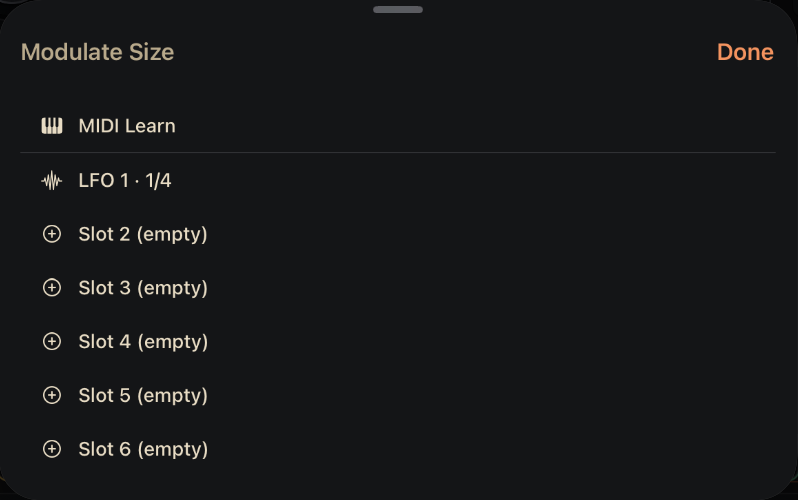
MIDI Learn. Standalone app only. Arms the dial for the next controller you move. See MIDI and controllers.
A running slot. Tap to add the dial to that slot as a target.
An empty slot. Tap to start that slot as an LFO with this dial as its target.
Done. Closes the sheet.
The six slots
MOD shows the slots as a grid of six live previews. An empty slot shows +. An LFO slot shows its waveform with a moving dot, and a Euclid slot shows its pattern with the current step lit. The line under each preview says what it is doing, for example 1/4 → Grain Size or 1.0 Hz → 2 targets.
Tap a slot to edit it. An empty slot opens as an LFO.
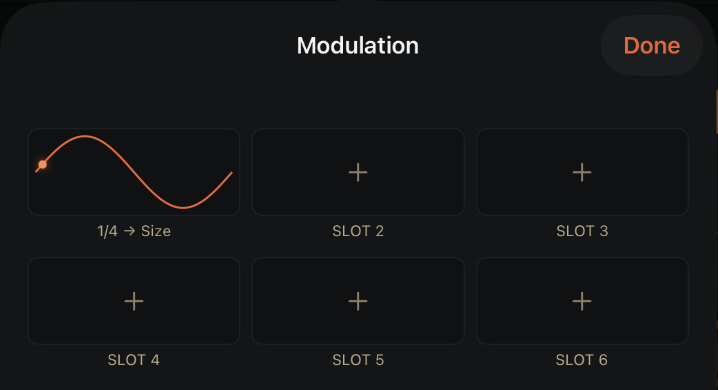
Slot preview. A running slot shows its waveform or pattern, live. Tap it to edit the slot.
Status line. The rate and what the slot drives, for example 1/4 → Size.
Empty slot. Tap to set it up. It opens as an LFO.
Done. Closes the sheet.
Slot settings
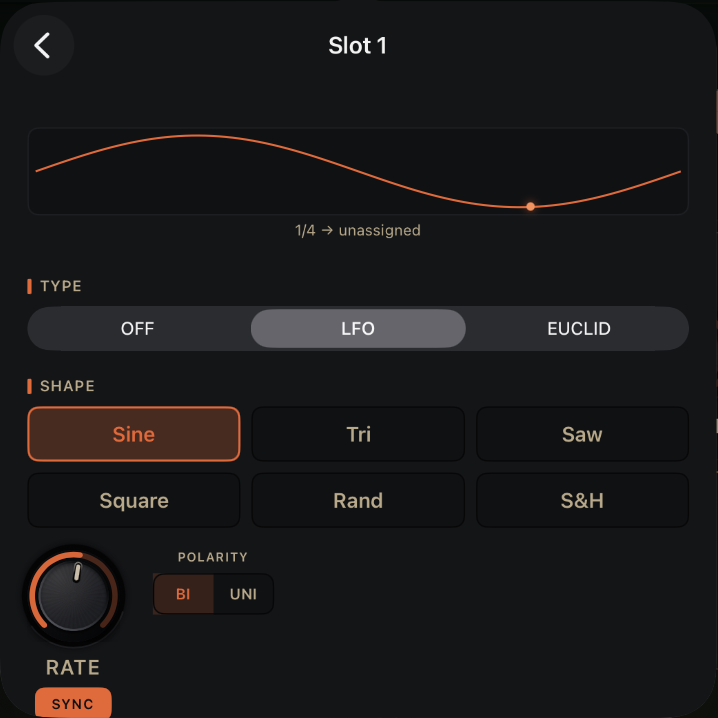
Back. Returns to the six slots.
Live preview. The slot's shape, with a dot at the current point.
Type. OFF, LFO or EUCLID. The controls below change to match.
Shape. The LFO waveform. See LFO.
RATE. How fast the slot runs.
SYNC. Locks RATE to note lengths from the tempo.
POLARITY. BI swings both ways around the dial's setting; UNI only adds.
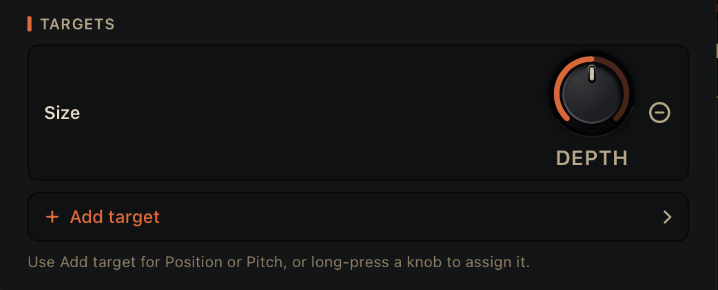
Target. A parameter this slot drives. See Targets.
DEPTH. How far this slot moves this target.
Remove. Takes this target off the slot.
Add target. Picks another parameter to drive, up to four per slot.
Type sets what the slot is: OFF, LFO or EUCLID.
LFO
| Control | What it does | Range | Default |
|---|---|---|---|
| Shape | The waveform. | Sine, Tri, Saw, Square, Rand, S&H | Sine |
| RATE | How fast it cycles. | Free: 0.02 Hz to 20 Hz. Synced: 4/1 to 1/64. | Synced, 1/4 |
| SYNC | Locks RATE to note lengths from the tempo. | On or off | On |
| POLARITY | BI swings either side of where the dial sits. UNI only adds to it. | BI, UNI | BI |
The tempo comes from the host. In the standalone app it comes from Tempo in Settings.
EUCLID
A Euclidean rhythm spreads a number of hits as evenly as it can across a number of steps. Each hit is a pulse of modulation.
| Control | What it does | Default |
|---|---|---|
| HITS | How many pulses in the pattern. | 4 |
| STEPS | How long the pattern is, 1 to 16 steps. | 8 |
| ROTATE | Shifts where the pattern starts. | 0 |
| MORPH | 0% gives hard on/off pulses. Turn it up to soften each pulse toward a ramp. | 0% |
| RATE and SYNC | How fast the steps go, as for the LFO. | Synced, 1/4 |
The Pattern row shows the steps as dots, with the hits filled in.
Targets
Each slot drives up to four targets. Every target has its own DEPTH dial, from 0 to 100%, starting at 50%. Remove a target with the minus button next to it.
Tap Add target to pick from the full list:
Position, Grain Size, Density, Speed, Jitter, Spread, Pitch, Reverb, Reverb Space, Filter Cutoff, Filter Resonance, Pitch Random, Reverse.
Position and Pitch have no dial to hold, so Add target is the only way to reach them. Position moves the read point through the sample. Pitch moves the transposition.
More than one slot can drive the same parameter, and their movements add together.
Seeing what moves
- A gold ring on a dial orbits at the value the modulation is giving it right now.
- A gold ghost puck on an XY pad shows where modulation is moving that pad's axes. See The XY pads.
The other rings on a dial mean something else. The faint gold arc is how far Morph is pushing the dial. A cyan ring is host automation. An amber ring that pulses is MIDI Learn waiting for a controller.
MOVE
MOVE makes Morph drift on its own. Hold the Morph knob to open MORPH MOVE.
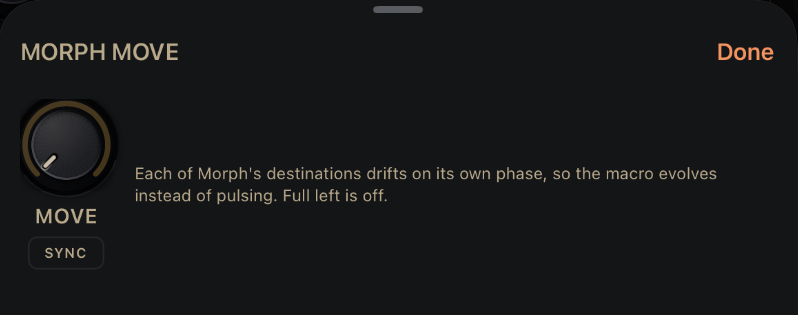
MOVE. How fast Morph drifts. Full left is off.
SYNC. Locks MOVE to note lengths from the tempo.
Done. Closes the sheet.
| Control | What it does | Range | Default |
|---|---|---|---|
| MOVE | How fast Morph's destinations drift. Full left is off. | Off, then 0.02 Hz to 0.5 Hz | Off |
| SYNC | Locks MOVE to note lengths from the tempo. | On or off | Off |
Each of Morph's destinations drifts on its own phase, so the sound evolves instead of pulsing in step. A dot next to the Morph knob shows MOVE is running.
The Morph knob sets how far MOVE can go. Each destination breathes between none of Morph's push and the full amount the knob is set to. With Morph at zero there is nothing to move, so turn Morph up first. Because the destinations spend time below the top, MOVE on sounds about half as strong as the same Morph setting with MOVE off. See Morph.
In Stretch, Morph is dimmed, and MOVE has no effect.