Playheads
Field can read one sample with up to three playheads at once. Each head makes its own stream of grains, so you can play one sound against itself: at different speeds, a fifth apart, or panned across the stereo field.
Heads save with presets, and with your session in a host.
Open the Playheads panel
- On iPad, tap the HEADS chip in the top bar. It shows a coloured dot for each head and the head count. See Screen at a glance.
- On iPhone, and in narrow host windows, tap HEADS on the dial page.
The heads are coloured: head 1 is amber, head 2 green, head 3 gold. The same colours mark each head's line on the waveform.
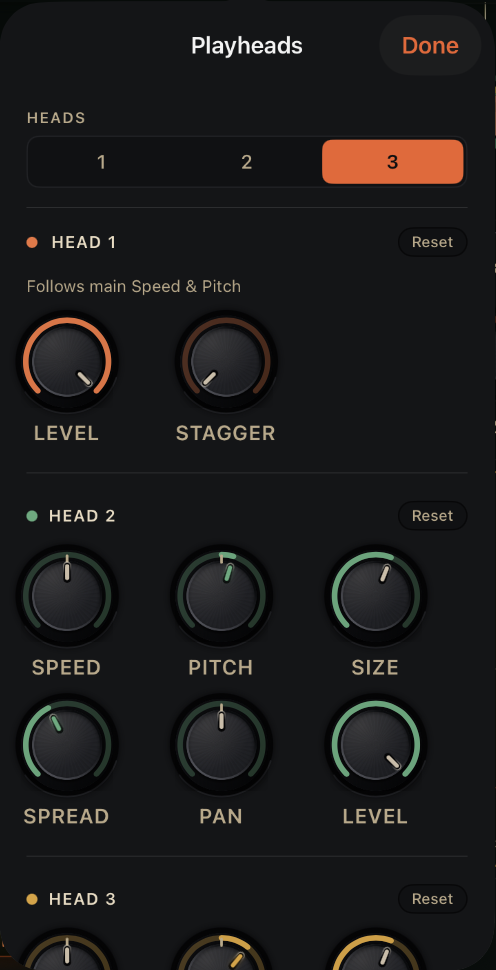
HEADS. How many playheads, 1 to 3. See How many heads.
Reset. Puts that head's dials back to their defaults.
LEVEL (head 1). Head 1's level.
STAGGER. Spreads the heads apart in time. See Head 1.
SPEED. How fast this head moves; 0 holds it still.
PITCH. This head's transposition in semitones.
SIZE. This head's grain length. Follows head 1 until you change it.
SPREAD. This head's stereo scatter. Follows head 1 until you change it.
PAN. Where this head sits left to right.
LEVEL. This head's level. Head 3 has the same six dials in gold. See Heads 2 and 3.
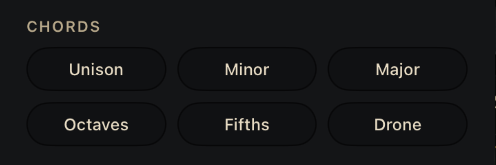
CHORDS. Sets the heads up in one tap. See Chords.
How many heads
HEADS at the top of the panel picks 1, 2 or 3. A new head starts matched to head 1 in size and spread, so it sounds full right away.
Head 1
Head 1 follows the main Speed dial and the Pitch ribbon. With two or three heads it gets two more dials:
| Dial | What it does | Range | Default |
|---|---|---|---|
| LEVEL | Head 1's level. | 0 to 100% | 100% |
| STAGGER | Spreads the heads apart in time. At 0 every head starts its grains together. Turn it up to spread them across each grain. | 0 to 100% | 0% |
Heads 2 and 3
Each extra head has its own dials, and a Reset button.
| Dial | What it does | Range | Default |
|---|---|---|---|
| SPEED | How fast this head moves through the sample. 0 holds it still. | −2.00× to +2.00× | 0× |
| PITCH | Transposes this head, in semitones, on top of the Pitch ribbon. | −24 to +24 | 0 |
| SIZE | Grain length for this head. | 5 ms to 1500 ms | Follows head 1 |
| SPREAD | Random stereo placement for this head's grains. | 0 to 100% | Follows head 1 |
| PAN | Where this head sits in the stereo field. | Left to right | Centre |
| LEVEL | This head's level. | 0 to 100% | 100% |
SIZE and SPREAD follow head 1 until you change them. Double-tap either to make it follow head 1 again.
Chords
The CHORDS buttons at the bottom of the panel set the heads up in one tap:
| Chord | Heads | What it sets |
|---|---|---|
| Unison | 1 | One head. |
| Minor | 3 | Heads 2 and 3 at +3 and +7 semitones. |
| Major | 3 | Heads 2 and 3 at +4 and +7 semitones. |
| Octaves | 3 | Heads 2 and 3 an octave up and an octave down. |
| Fifths | 2 | Head 2 a fifth up. |
| Drone | 3 | Heads 2 and 3 crawling slowly in opposite directions. |
Every chord is a starting point. Change any dial afterwards.
On the waveform
Each head draws its own line on the waveform. Drag a head's line to move that head on its own. Double-tap the waveform to gather every head at the spot you tapped.
In Stretch
In Stretch the chip reads VOICES and the panel is called Stretch Voices. The voices share one playhead, so they share Speed, Size and Stagger, and those dials are dimmed. Pitch, Pan and Level still work per voice, which makes a stretched chord.
CPU
Every head adds grains, so three heads cost more than one. On older devices, turn on Eco multi-head in Settings. It splits the grain rate across the heads instead of giving each head the full rate. See Performance.