Screen at a glance
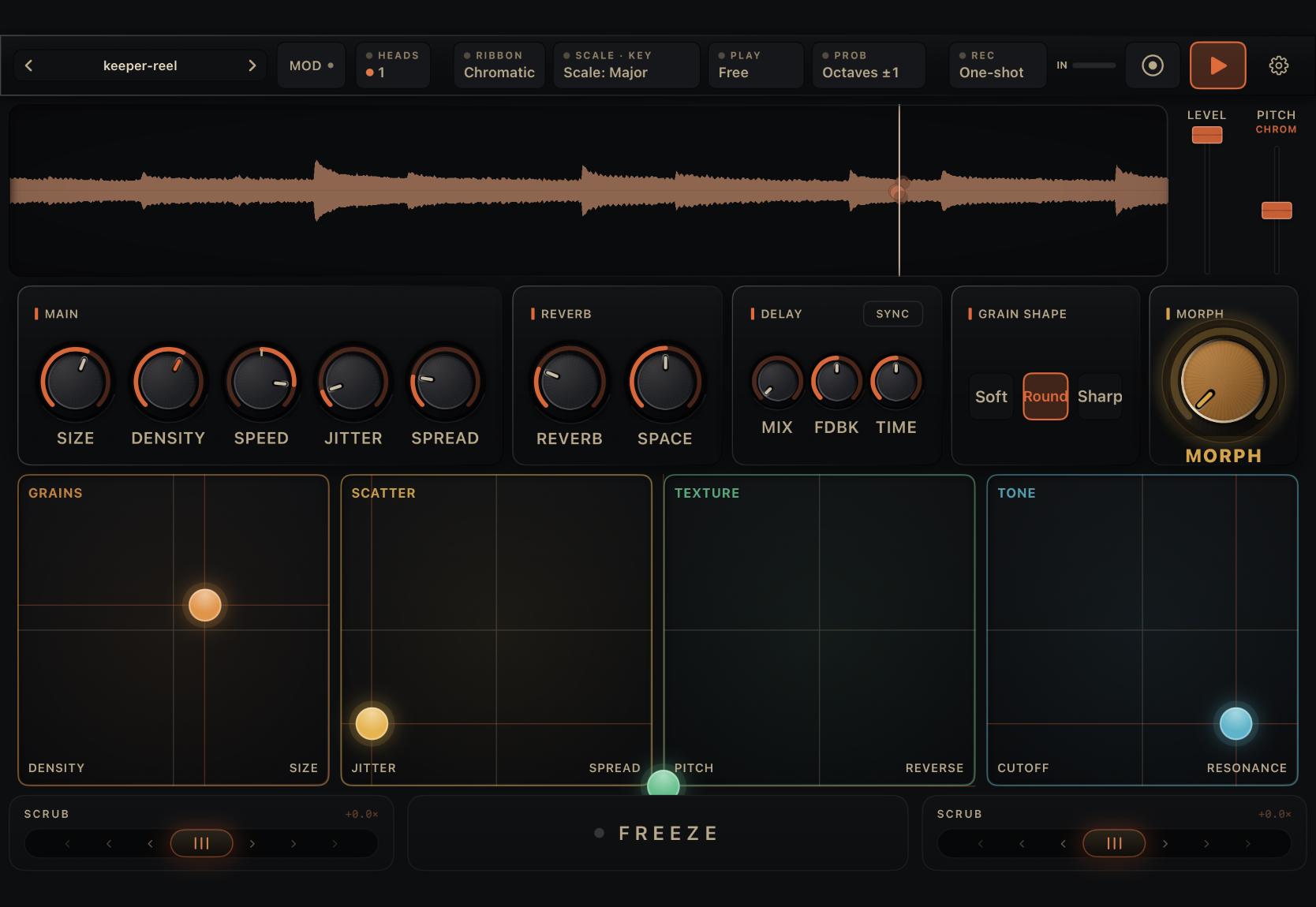
The picture below is Grainsmith Field 1.6 on iPad, with numbers on the controls. Find the control in the picture, then read the entry with the same number underneath. Click or tap a number to jump to its entry. The entries link to the pages that go deeper.
Field runs on one landscape screen. There are no tabs and no pages to dig through on iPad. From top to bottom: the top bar, the waveform with its two ribbons, the five panels, the four XY pads and the scrub deck. iPhone has the same instrument in a smaller frame, with some controls moved. See On iPhone at the end of this page.
Top bar
Preset name. Shows the loaded preset, or the sample name if no preset is loaded. A * means you have changed something since the last save or load. Tap the name to open the preset browser. The arrows on either side step to the previous or next preset. See Presets.
MOD. Opens Modulation, with six slots that move parameters on their own. The dot lights when any slot is running. See Modulation and MOVE.
HEADS. Shows how many playheads are reading the sample, from 1 to 3, as coloured dots. Tap it to open Playheads, where each extra head gets its own Speed, Pitch, Size, Spread, Pan and Level, plus one-tap chords. In Stretch it reads VOICES. See Playheads.
RIBBON. What the Pitch ribbon (15) snaps to when you let go: Octaves, Oct+5ths, Scale, Free or Chromatic. The default is Chromatic. See The Pitch ribbon.
SCALE · KEY. Picks the scale, and the KEY that grains land on: Off, one of the twelve roots, or Auto. The dot lights when a key is set. See The scale.
PLAY. Free, Stretch or Instrument. Free is the normal grain cloud. Stretch plays the whole buffer as one smooth time-stretch. Instrument plays grains from MIDI notes, with Attack, Release and Root Note in the same popover. See MIDI and controllers.
PROB. How grains move when pitch probability transposes them: the interval, the range (1 to 3 octaves) and the direction. The default reads Octaves ±1. See Pitch probability.
REC. The record mode: One-shot, Loop or Live, with the loop length, feedback and wet mix. It shows the mode and length, for example Live 2.0s. See Recording and Live mode.
IN meter. The level of audio coming in. It changes colour near clipping.
Record. Tap to start recording into the grain buffer, tap again to stop. The REC chip (8) sets what kind of recording it makes. It is dimmed on Bluetooth audio, which cannot record.
Play. Starts and stops the grains.
Settings. Stretch, Instrument, every pitch setting, controllers, MIDI learn, the standalone tempo, Eco multi-head and About. See Settings.
The chips (3 to 8) apply as soon as you tap a choice. Tap outside the popover to close it. A chip's dot lights when its setting is not at the default.
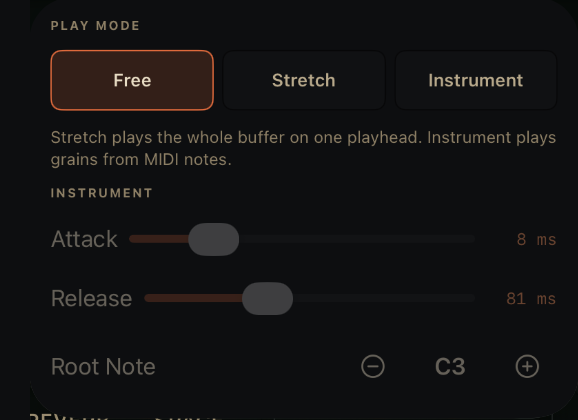
Play mode. Free, Stretch or Instrument. See Stretch.
Attack. How fast a MIDI note fades in. Instrument mode only.
Release. How fast it fades out after you let go.
Root Note. The MIDI note that plays at the original pitch. See MIDI and controllers.
Waveform and ribbons
Waveform. The loaded sample, the grain cloud and a line for each playhead. Touch and drag to move the read position. Double-tap with two or three heads to gather them at that spot. Long-press for the grain-buffer menu: export, copy, paste, Edit Area and clear. Badges in the corners show STRETCH, FROZEN and REC.
LEVEL. The level of every grain, from unity at the top down to silence. Double-tap for unity.
PITCH. Transposes the grains up to two octaves either way. The small label under PITCH shows the ribbon mode; tap it to change the mode here instead of in the RIBBON chip (4). In Instrument mode it reads TRANSPOSE. See Pitch.
Panels
Hold any dial in Main or Reverb to modulate it, or to MIDI-learn it in the standalone app. Hold any other dial for fine adjustment. Double-tap a dial to reset it.
Main. Size, Density, Speed, Jitter and Spread, the five dials you reach for most. See Main.
Reverb. Reverb sets how much; Space sets the size of the room. See Reverb.
Delay. A stereo delay for granular tails: MIX, FDBK (feedback) and TIME. SYNC locks TIME to note lengths from the host tempo, or from the standalone tempo in Settings. MIX starts at 0, so the delay is silent until you turn it up.
Grain Shape. Soft, Round or Sharp grain edges. Dimmed in Stretch. See Grain Shape.
XY pads
Each pad moves two settings with one finger. A gold ghost puck shows where modulation is moving an axis. See The XY pads.
Grains. Density across, Size up.
Scatter. Jitter across, Spread up.
Texture. Pitch probability across, Reverse up.
Tone. Filter cutoff across, resonance up.
Scrub deck
Scrub. Two spring-loaded rockers, one in each corner. Push one to move the read position forward or back, up to 2× speed; let go and it springs back.
Freeze. Holds the read position so grains keep coming from one spot. Tap again to release.
On iPhone
The iPhone keeps the top bar, the waveform and the scrub deck, and swipes the middle between a page of dials and the four XY pads. The rail on the left jumps between them.
- The chips are not shown, except REC (8). Play mode, scale, key and probability are in Settings.
- HEADS (3) is a button on the dial page.
- LEVEL (14), Reverb (17), Grain Shape (19) and Delay (18) are in the ADV sheet on the dial page.
- On iPhone, Reverb and Space have no hold-to-modulate. Add them from a slot with Add target instead.
An iPad window that is narrow, such as an AUv3 in a host, shows a single PERF chip in place of RIBBON, SCALE · KEY, PLAY and PROB. It opens the same four panels as tabs.