SYNTH Tab
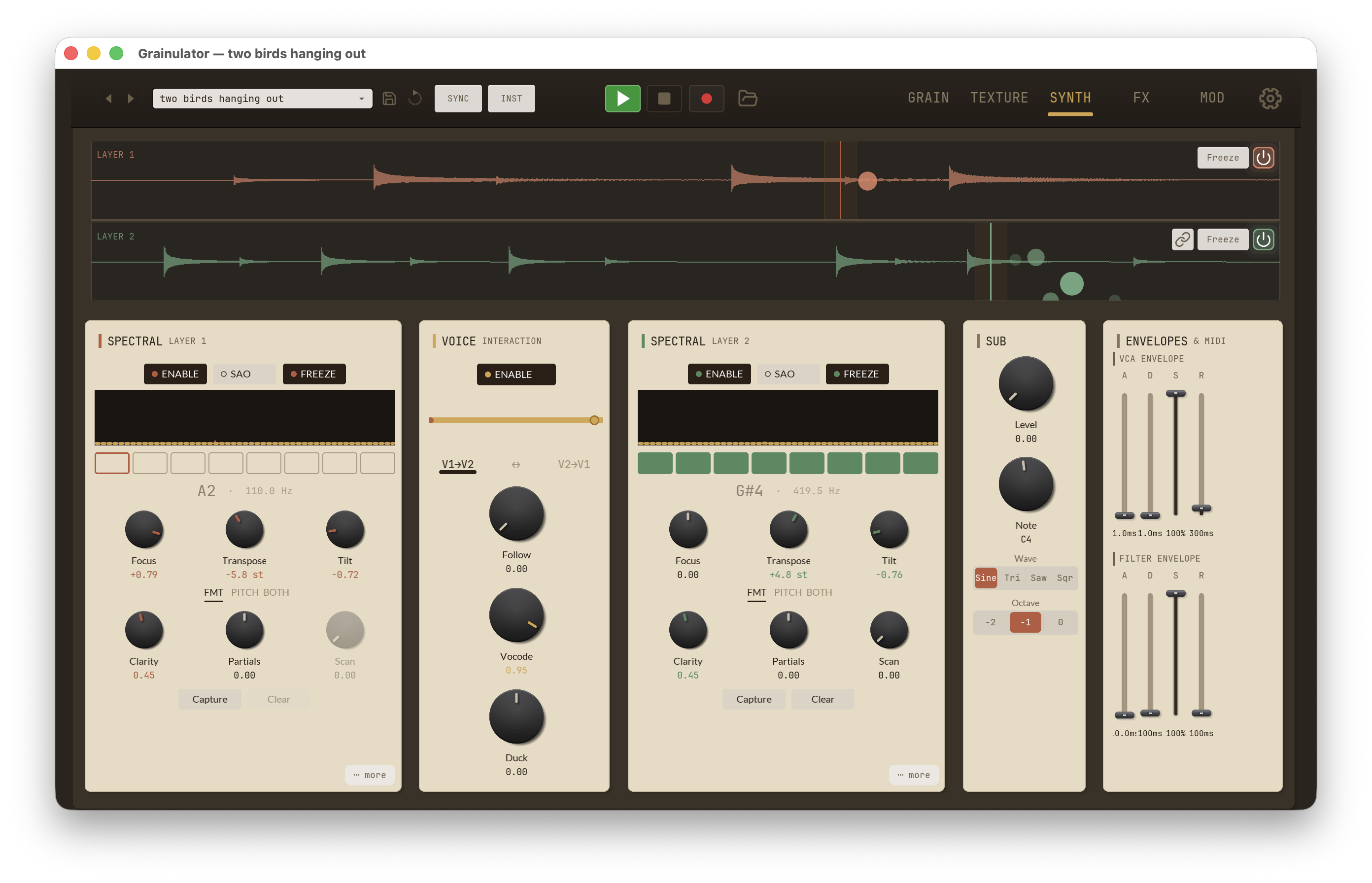
The SYNTH tab gathers the traditional-synthesis elements that sit on top of the granular core: the two Spectral Array Oscillator (SAO) columns — per-layer phase-vocoder synths — a Voice Interaction panel between them for cross-layer routing, a Sub Oscillator, and the Envelopes & MIDI column that holds the VCA + filter ADSRs alongside the per-layer root notes and glide.
Unlike the GRAIN tab — where every knob edits one layer at a time — most of
the SYNTH panels drive a single shared engine. The Sub Oscillator, VCA
envelope, Filter envelope, and Glide are global: they are mounted in
the UI via Layer 1's parameters and any change applies to both layers. The
two Spectral columns are genuinely per-layer — Layer 1 and Layer 2
each have an independent Spectral Array Oscillator. Only
Root 1 and Root 2
are genuinely independent per layer.
Spectral panel (Spectral Array Oscillator)
Each layer has its own Spectral Array Oscillator (SAO) column that sits at the head of the SYNTH tab — Layer 1's panel on the left, Layer 2's on the right, with the Voice Interaction panel between them. The SAO is a phase-vocoder-based synth that treats each layer's post-grain audio as a stream of frequency-domain frames, then captures, re-shapes, and re-tunes them. It is MIDI-responsive and polyphonic — held notes drive multiple internal voices through a single SAO instance.
What it actually does
Under the hood, the post-grain audio for each layer feeds a 2048-point FFT with 75 % overlap (hop = 512 samples). For every hop:
- Analyse the input into magnitudes + phases.
- Apply the Focus max-hold smoother (positive values only — see Focus below).
- Track phase history for frozen-spectrum phase progression.
- If
Freezeis engaged: blend the captured magnitudes into the live spectrum with re-enhancement controlled byClarity. - Apply the Partials odd/even gate, keyed off the
Fundfrequency. - Apply the F↔P morph between formant-only and pitch-only shifting.
- Apply Tilt as a broadband spectral EQ.
- If this layer is a Voice-Interaction follower with
Vocode> 0: multiply bins by the driver layer's mean-normalised spectral envelope. - Publish this layer's magnitudes so the partner can vocode next block.
- IFFT + overlap-add back into the audio stream.
In SAO mode, step 1 is replaced — instead of analysing the live input, the SAO interpolates magnitudes between adjacent slots in the Spectral Array (the bank of captured frames) and advances phase from the captured increments. Everything from step 4 onward still applies to the SAO-rendered frame.
The result: every Spectral knob shapes the frame whether it came from live input or from the captured Array.
Top toggles
A row of three toggles runs along the panel header. They use the spectral-synth pill style with the layer's accent fill when engaged:
| Toggle | Behaviour |
|---|---|
ENABLE |
Master power for the Spectral panel. Off bypasses the SAO entirely and consumes no CPU — useful for A/B comparisons against the raw grain output. A short wet/dry crossfade eases the toggle so it doesn't click in playback. |
SAO |
Switches between Spectral Array Oscillator mode (free-running off the captured Array, MIDI-driven polyphonic re-pitch) and the simpler frame-pass mode (the live grain output is the source). SAO is the right pick for melodic playing; frame-pass is for spectral effects on the grain stream itself. |
FREEZE |
Captures the current post-enhancement spectrum and holds it, then progresses phase from the captured increments so the frozen tone has motion rather than sitting on a single STFT frame. No effect when SAO is on — the Array is the source of truth. |
8-step pitch grid
Beneath the toggles, an 8-cell pad row displays the SAO's pitch
sequence — each cell represents one slot of the Spectral Array. The
active cell (whichever Scan is currently pointing at) is highlighted in
the layer's accent colour (coral for Layer 1, green for Layer 2). The
current centre pitch (e.g. A2,
G#4) and its frequency are displayed
alongside the grid so you can see where the SAO is reading from at a
glance.
Captures fill the slots in order and wrap at 8 — the 9th capture overwrites slot 0, the 10th overwrites slot 1, and so on (a ring buffer). Use Clear to wipe the Array and reset the next-capture pointer to slot 0.
Knobs (top row)
Three knobs above the FMT toggle shape the spectral frame's pitch character and harmonic balance:
| Control | Range | Description |
|---|---|---|
Focus |
−1 to +1 | Per-bin max-hold magnitude smoother. At 0 the spectrum tracks input instantly. Positive values hold magnitudes with decay, so transients linger across several FFT hops — turning taps into tonal bells, smoothing gaps in sparse material. Negative values are reserved for future use and currently clamp to 0. |
Transpose |
−24 to +24 st | Pitch offset applied to the entire spectral frame, in semitones, independent of MIDI note tracking. Use to detune one layer against the other or to drive the SAO into very high / very low registers. |
Tilt |
−1 to +1 | Broadband spectral EQ with a tilted shelf. Negative darkens (rolls off highs); positive brightens (rolls off lows). At ±1 the band-edge shift is roughly ±15 dB, softly normalised so loudness stays roughly constant as you sweep. |
FMT / PITCH / BOTH toggle
A FMT — PITCH — BOTH segmented toggle sits between the two knob rows.
It controls how MIDI notes interact with the spectral frame:
| State | Behaviour |
|---|---|
FMT |
Formant-only — incoming notes shift the spectral envelope (the "vowel" character) without moving the fundamental. Useful for keeping a captured drone in tune while morphing its timbre. |
PITCH |
Pitch-only — notes re-pitch the frame without preserving formants. The classic phase-vocoder pitch shift; high notes will sound "chipmunked" on speech-like material. |
BOTH |
Both formant and pitch track the played note. The default — the most "synth-like" behaviour, closest to a sampler that re-pitches everything together. |
Knobs (bottom row)
| Control | Range | Description |
|---|---|---|
Clarity |
0–1 | A combined "how clean is the captured tone" control that drives both spectral Character (peak-prominence extraction) and PeakLock (zeroing of non-peak bins) along a single axis. Low values preserve the natural envelope (noisy/textural); high values heavy-handedly extract a harmonic skeleton (clean, tuned, drone-like). Only affects captures — sweep at capture time to decide how much residue to keep. |
Partials |
−1 to +1 (bipolar) | Odd/even harmonic emphasis, keyed off Fund. Negative attenuates even partials (odd-only, hollow / clarinet-like); positive attenuates odd partials (even-only, softer / fuller); 0 is neutral. A Gaussian soft-sidelobe keeps the gate from acting like a comb filter at low fundamentals, and the gated spectrum is energy-normalised so the knob reads as timbre rather than volume. Most audible on pitched material tuned to Fund. |
Scan |
0–1 | Position within the Spectral Array. With SAO on, Scan is the primary "pitch/timbre" sweep across the captured slots — automating it with an LFO produces a morphing spectral wavetable. Log-tapered for finer control at the low-slot end. With SAO off, Scan has no audible effect (reserved for a future ghost-blend feature). |
Fund frequency
A small Fund readout sits inside the spectrum
display, with a tiny edit cap and a manual-override toggle. It sets the
fundamental frequency the Partials gate keys off (range 20 Hz –
2 kHz, default 110 Hz). Set it to the pitch of your source for crisp
odd/even selection. At 48 kHz / 2048 FFT, bin resolution is ≈ 23 Hz, so
fundamentals below ~25 Hz won't resolve individual harmonics. Not
modulatable — audio-rate changes here cause bin-quantisation zipper.
When the manual-override toggle is off, the SAO auto-tracks the detected fundamental from the input.
Capture / Clear
Two buttons at the bottom of the panel control the Spectral Array:
Capture— snapshots the current post-processed spectrum into the next Array slot. Press while audio is playing through the layer to load fresh material. The capture inherits the currentClaritysetting, so the cleaner Clarity is at capture time, the more skeletal the slot.Clear— wipes all 8 slots and resets the next-capture pointer to slot 0.
The captured Array is per-layer and is saved with the preset, so you can build a fixed bank of spectra (pad / speech / bowed string / drum) and recall it from any session.
Modulation routing
All continuous Spectral controls are routable as Mod Matrix destinations. The Voice Interaction panel's knobs (Follow / Vocode / Duck) live under a separate Voice FX category — see the MOD tab reference for the full list.
| Mod destination | Range mapping | Notes |
|---|---|---|
Transpose |
±24 st | Bipolar |
Tilt |
±1 | Bipolar |
Frz Blend |
0–1 | Unipolar |
Clarity |
0–1 | Unipolar — drives the combined Character + PeakLock pair |
Focus |
0–1 | Positive side only; negative mod is ignored |
Freeze |
gate | Thresholds on 0.5 — useful for a momentary freeze stab |
Formant Mix |
0–1 | Unipolar — sweeps F ↔ P from formant-only (1) to pitch-only (0) |
Partials |
±1 | Bipolar |
Scan |
0–1 | Unipolar — LFO this to auto-scan the Array |
Deliberately not modulatable: Fund
(bin zipper at audio rate), the SAO toggle
(discrete state switch), and Capture /
Clear (one-shot triggers — mod retrigger
would erase user state).
Recipes
- Pad / ambient bed — feed a slow grain cloud, raise
Focusto ~0.7,Clarityto ~0.6. EnableFreeze. The Spectral panel produces a slowly mutating drone over the granular wash. - Harmonic stencil from any source — set
Clarityto ~0.8, play pitched material through the layer, hitCapture. ToggleSAOon. The captured slot is now a clean, tuned tone you can play polyphonically. - Spectraphon-style wavetable — capture 4–6 slots from varied
source material (pad / speech / bowed instrument / drum hit), toggle
SAOon, route an LFO at ~0.03 Hz toScan. The SAO morphs between captured spectra like a single-cycle wavetable, but with rich harmonic evolution between slots. - Vocoder-style talkbox — load speech into Layer 2's grain buffer,
switch the Voice Interaction direction to V2 → V1, set
Vocodeto ~0.8. Layer 1's tone takes on Layer 2's formant envelope each STFT hop. - Drum tonalisation — feed a percussive loop, raise
Focusto ~0.9 (max hold turns transients into ringing tones), setPartialsto +0.6 andFundto the drum's apparent pitch for a mallet-instrument character.
Voice Interaction panel
Sits between the two Spectral columns. Three knobs drive categorically different cross-voice effects — Follow (time-domain source coupling), Vocode (spectral envelope transfer), and Duck (amplitude sidechain) — governed by a shared direction switch and a power toggle that bypasses the whole section.
An animated bus indicator above the direction switch visualises current effect amount (line thickness) and routing (flow direction of the travelling dots). In Both mode the dots follow whichever layer is louder at the moment.
Direction
One 3-state segmented control governs all three knobs:
| State | Behaviour |
|---|---|
V1 → V2 |
Layer 1 is driver; Layer 2 is follower. All three knobs affect Layer 2 only. |
V1 ↔ V2 (Both) |
Mutual / symmetric. Each layer acts on the other with the same knob amounts. |
V2 → V1 |
Layer 2 is driver; Layer 1 is follower. |
Knobs
| Control | Range | Description |
|---|---|---|
Follow |
0–1 | The follower layer's granular engine reads the driver's live post-grain audio instead of its own loaded buffer. At 1 the follower is fully tracking the driver's output; at 0 it plays its own buffer (default). The follower's Position knob is reinterpreted as ring-buffer age — 0 = newest, 1 = oldest (~2 s back). Grain size, pitch, and speed still work inside the live source. In Both mode, a one-block latency prevents feedback. |
Vocode |
0–1 | True spectral vocoding. The driver's mean-normalised spectral envelope multiplies the follower's bin magnitudes. At 1 the follower adopts the driver's timbral/formant contour while keeping its own harmonic content. Loudness-preserving — the mean normalisation stops the follower from getting quiet when the driver is sparse. |
Duck |
−1 to +1 | The driver's amplitude envelope modulates the follower's output gain. Negative = classic sidechain duck (follower dips when driver is loud). Positive = "swell" / shadow (follower amplifies with the driver). 0 is bypass. Attack ≈ 3 ms, release ≈ 150 ms. Read from pre-duck envelopes so mutual ducking in Both mode is feedback-safe. |
Power toggle
The power icon in the panel title stripe hard-bypasses the entire section. Use it to A/B the contribution of Voice Interaction without resetting all three knobs.
Mod routing
All three knobs are available as mod destinations under a new Voice FX category on the MOD tab. The direction switch and power toggle are not modulatable (they're discrete state), but their param values round-trip cleanly through preset save/load and DAW automation.
Sub Oscillator
A global monophonic sub that tracks the played note and thickens the low
end. Set Level to 0 to disable.
| Control | Range | Description |
|---|---|---|
Level |
0–1 | Output level of the sub. 0 silences it. |
Note |
0–127 (MIDI) | Base pitch of the sub when no MIDI note is playing (Free mode), or the reference pitch in Instrument mode. Displayed as a note name. |
Wave |
Sine / Tri / Saw / Sqr | Oscillator waveform. Sine is pure, Triangle is soft, Saw and Square (both band-limited) add harmonics. |
Octave |
−2 / −1 / 0 | Octave offset relative to the played note. |
VCA Envelope
A global ADSR that shapes the amplitude of every played note. In Instrument play mode the envelope retriggers on each note-on; in Free mode it effectively holds at sustain while the global transport is running.
| Control | Range | Default | Description |
|---|---|---|---|
A (Attack) |
0.001–3 s | 1 ms | Time from note-on to peak level. |
D (Decay) |
0.001–5 s | 1 ms | Time from peak down to the sustain level. |
S (Sustain) |
0–1 | 1.0 | Level held while the note is active. |
R (Release) |
0.001–5 s | 300 ms | Time to fade to silence after note-off. |
Filter Envelope
A second ADSR that modulates the per-layer filter cutoff. The filter
itself — model, cutoff, resonance, drive — lives on the GRAIN tab
FILTER column, along with the bipolar Depth
knob that scales how much of this envelope reaches the cutoff.
| Control | Range | Default | Description |
|---|---|---|---|
A (Attack) |
0.001–3 s | 10 ms | Time from note-on to peak envelope level. |
D (Decay) |
0.001–5 s | 100 ms | Time from peak to sustain. |
S (Sustain) |
0–1 | 1.0 | Level held while the note is active. |
R (Release) |
0.001–5 s | 100 ms | Time to fade after note-off. |
With Depth at 0 the envelope has no effect. Push
it positive to open the filter on note-on and let it close back toward the
static cutoff; push it negative to invert the shape.
MIDI control
Grainsmith has two play modes, selected in the header settings popup:
- Free — the global transport runs grains continuously; MIDI notes are ignored for pitch.
- Instrument — note-on / note-off gate the VCA and filter envelopes, and incoming notes transpose the grain pitch relative to the layer's root note.
The root-note and glide controls live in the Envelopes & MIDI column alongside the ADSR sliders:
| Control | Range | Default | Description |
|---|---|---|---|
Root 1 |
0–127 (MIDI) | 60 (C3) | Root note for Layer 1. When you play this MIDI note in Instrument mode, Layer 1 plays its source at unshifted pitch. |
Root 2 |
0–127 (MIDI) | 60 (C3) | Root note for Layer 2, independently settable. |
Glide |
0–2 s | 0 s | Portamento time between consecutive MIDI notes. Applied to both layers. |
Both root-note knobs render their value as a note name
(C3, F#4, …) rather
than a raw number, matching the
Note knob on the Sub panel.
On every MIDI note-on in Instrument mode the engine calculates
note − root for each layer and applies that offset on top of the
Pitch knob from the GRAIN tab — so Layer 1 and
Layer 2 can transpose against the same incoming note by setting different
root values.
Glide smooths pitch transitions between notes
at the per-layer level; 0 disables portamento, 2 s gives a long, slow
slide. It applies equally to both layers.
See also
- GRAIN Tab — the per-layer filter (model, cutoff, resonance, drive, envelope depth) lives there
- MOD Tab — route LFOs, envelopes, and step sequencers to sub, envelope, and FX parameters
- Layer System