TEXTURE Tab
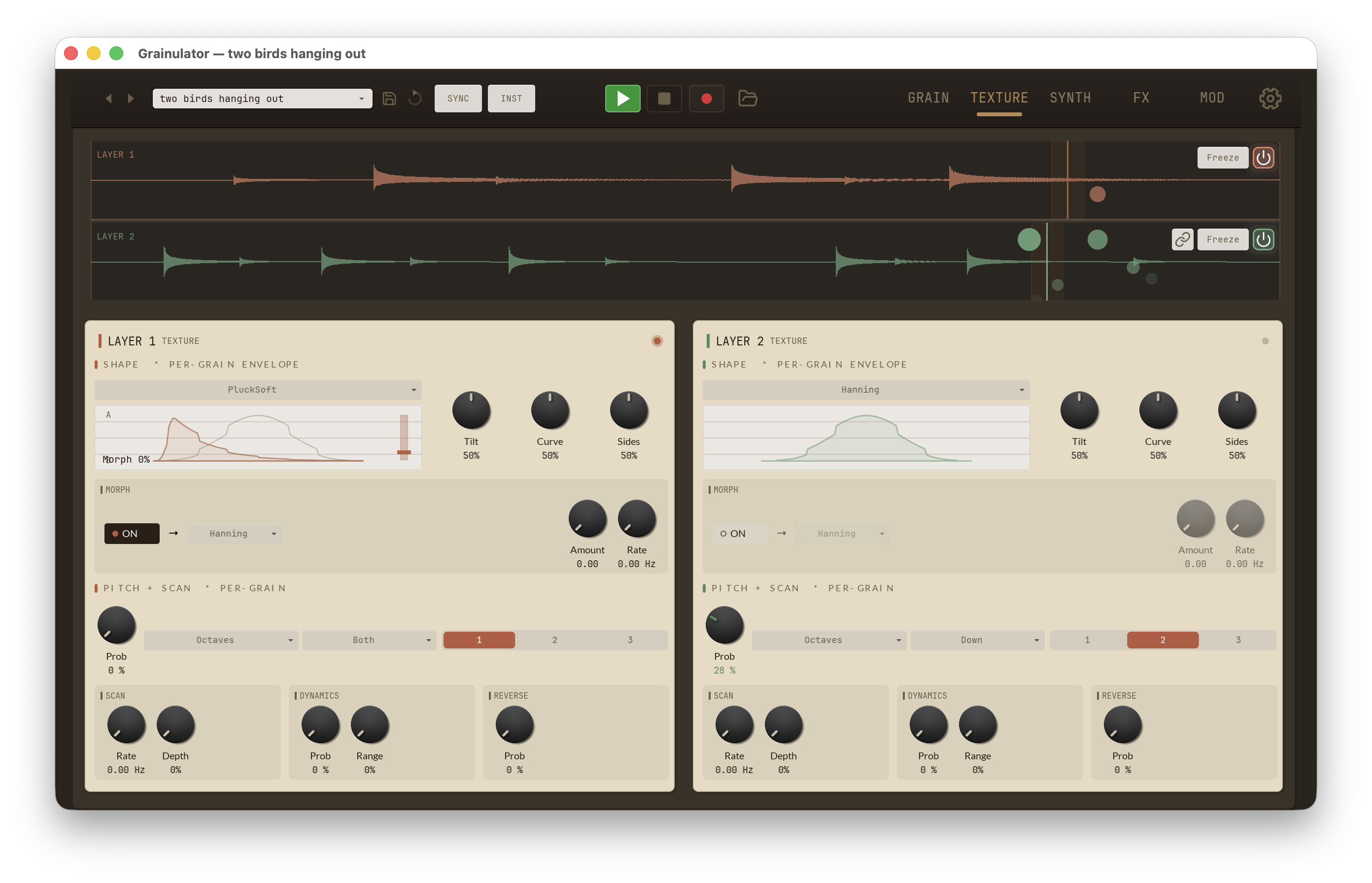
The TEXTURE tab shapes the character of each grain once the GRAIN tab has decided how big, how dense, and from where in the buffer it reads. Everything here is per-layer — the dual waveform display sits at the top of the tab (Layer 1 in orange above, Layer 2 in green below) and two side-by-side LAYER 1 TEXTURE / LAYER 2 TEXTURE panels underneath hold identical sets of controls. The descriptions on this page apply to both layers; values are tracked independently.
Each panel groups its controls into three labelled sections plus a bottom mini-row:
- Shape · per-grain envelope — the window applied to every grain
- Morph — optional automatic crossfade to a second window shape
- Pitch + Scan · per-grain — random pitch variation per grain plus the buffer-scan LFO
- SCAN / DYNAMICS / REVERSE mini-row — three small groups along the bottom of the panel
Shape — per-grain envelope
Every grain has an amplitude envelope ("window") applied on playback. The window determines whether grains sound smooth and pad-like, punchy and percussive, or plucked and decaying. The live preview to the right of the shape picker updates in real time as you tweak Tilt, Curve, and Sides.
| Control | Range | Description |
|---|---|---|
Shape |
Hanning / Gaussian / Trapezoid / Triangle / Tukey / Pluck / PluckSoft / ExpDecay | Base envelope shape applied to every grain. |
Tilt |
0–100% | Shifts the envelope peak earlier or later within the grain. 50% is symmetric. |
Curve |
0–100% | Bends the attack and release slopes between linear and exponential. |
Sides |
0–100% | Softens or sharpens the edges of the window (trapezoid / Tukey plateau width). |
Hanning and Gaussian give the smoothest, most classical granular sound. Trapezoid and Triangle produce punchier, more rhythmic grains. Pluck, PluckSoft, and ExpDecay give each grain a struck-string envelope that is great for pitched percussion and pointillist textures.
The "per-grain envelope" subtitle distinguishes this window from the VCA envelope on the SYNTH tab, which shapes the note as a whole rather than the individual grains inside it.
Morph
The dashed sub-panel below the Shape controls enables an automatic
crossfade from the base Shape into a second target shape, on a
per-grain basis. When On is engaged the layout shows the target
picker plus Amount and Rate knobs; when off, those controls dim out.
| Control | Range | Description |
|---|---|---|
On |
pill toggle | Master enable for the morph. Default off. |
Target |
same eight shapes as Shape | Second window shape to morph into. |
Amount |
0–1 | Current morph position between the base Shape (0.0) and the Target (1.0). With Rate at 0 this is a static crossfade you can sweep manually or modulate. |
Rate |
0–3 Hz | LFO speed that automatically cycles Amount between 0 and 1. At 0 Hz the morph is static (use Amount by hand). |
Pitch + Scan — per-grain
The left half of this section adds random pitch variation to individual grains at spawn; the right half (Scan Rate + Depth) lives in the SCAN mini-group below the dropdowns but is grouped under the same section header because both are per-grain modifications.
Only grains that "win" the Prob dice roll are re-pitched.
| Control | Range | Default | Description |
|---|---|---|---|
Prob |
0–100% | 0% | Chance that a new grain is re-pitched. 0% = always use base pitch, 100% = every grain. |
Mode |
Octaves / Oct+5ths / Scale / Free / Chromatic | Octaves | Which pitches a re-pitched grain is allowed to land on. Octaves transposes by whole octaves; Oct+5ths adds perfect fifths; Scale snaps to the selected scale; Free allows any continuous transposition; Chromatic rounds to whole semitones. |
Direction |
Both / Up / Down | Both | Constrains variation to move only upward, only downward, or in either direction from the base pitch. |
Range |
1 Oct / 2 Oct / 3 Oct | 1 Oct | Maximum transposition distance in octaves. Three-state selector. |
In Scale mode a scale selector chooses which of 12 scales the re-pitched grains snap to: Major, Minor, Pentatonic Major, Pentatonic Minor, Dorian, Mixolydian, Harmonic Minor, Phrygian, Lydian, Locrian, Whole Tone, and Chromatic.
This scale is the same setting the GRAIN-tab Pitch knob uses for its own Scale mode — pick a scale in either place and both follow. See the GRAIN tab Pitch modes for the knob side of it.
Note: Glide (pitch smoothing between notes) lives on the SYNTH tab's Envelopes & MIDI column alongside the per-layer root notes.
SCAN / DYNAMICS / REVERSE mini-row
The bottom of each TEXTURE panel collects three small groups along one horizontal row.
SCAN
A slow position LFO applied to the grain spawn point, sweeping through the buffer over time. Combine with a static Position knob on the GRAIN tab to drift around a focal point, or with Speed 0 to replace static freezing with gentle motion.
| Control | Range | Description |
|---|---|---|
Rate |
0–5 Hz | Speed of the scan LFO. 0 Hz disables scanning. |
Depth |
0–50% | Amount of buffer traversed by the LFO, as a fraction of the whole file. 50% covers half the buffer peak-to-peak. |
DYNAMICS
Randomises each grain's amplitude at spawn, adding natural breathiness
or aggressive volume jitter depending on the Range setting. The base
grain level itself lives on the GRAIN tab (Level);
this section only adds variation on top of it.
| Control | Range | Description |
|---|---|---|
Prob |
0–100% | Chance that a grain's amplitude is randomised. |
Range |
0–100% | Maximum amplitude deviation. 0% = no change, 100% = grains can be fully attenuated. |
REVERSE
| Control | Range | Description |
|---|---|---|
Prob |
0–100% | Chance that a grain plays backward. 50% gives an even mix of forward and reversed grains; 100% reverses every grain. |
Because only the grain's playback direction flips — not the source buffer — Reverse works with any position, speed, or loop setting and can be modulated for rhythmic forward/backward effects.