Your first sound
Open Particle Chimes for the first time and it plays itself.
What happens on a clean install
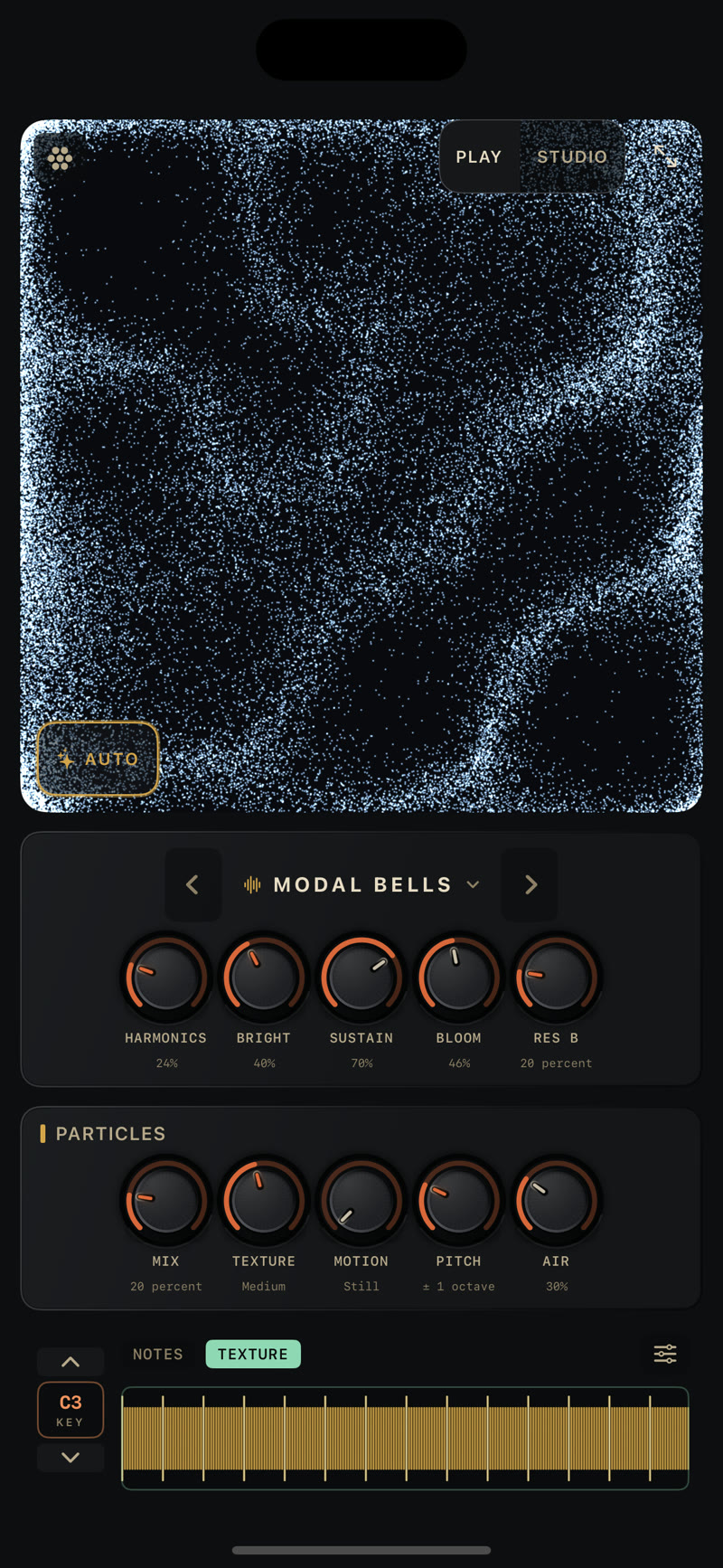
Let it run for a few seconds before you touch anything. A brand-new install opens full-screen into Play, the simplified surface. It loads a factory sound called Modal Bells, with the Ocean Current visual behind it. By default the AUTO player is active, and so is MOVEMENT drift, modulating a set number of parameters with gentle LFOs. That starts a simple ambient progression you can add to by tapping the performance ribbon at the bottom or strumming the screen.
Returning to a clean install
If you've used the app before (a saved sound, or a visualizer skin you've picked), the app will open with Auto off instead. The plays-itself intro is first-run only.
A first install also opens a three-card WELCOME sheet over the top of all this: Sounds, Visuals, and Studio, one card each pointing at the sound stepper, the visualizer picker, and the PLAY/STUDIO switch. It plays right through it, so you can read the cards while the intro is already going. Swipe through and tap Start playing on the last card, or just dismiss the sheet.
If you've used the app before and a new version adds something worth knowing, you get a WHAT'S NEW sheet instead, once per version, the first time you open the updated app. You can reopen the same note later from the What's New row at the bottom of the visualizer picker (see Visualizers). Neither sheet appears when Particle Chimes is running as the AUv3 plugin inside a host.
Modal Bells is a modal resonator patch with a moderate level of granular processing, which creates a touch of drone underneath, with reverb tying it all together.
Touch the ribbon
Drag your finger along the gold ridged strip at the bottom of the screen: the performance ribbon. Tap the individual segments to play notes, or strum across the whole ribbon. That's NOTES mode, the default. Play over whatever AUTO and the drone are already doing. The performance ribbon covers the other modes. Try TEXTURE mode for something different. The textured surface is guiro-like in the way it responds, clicking from note to note as you cross the ridges, and each new note re-triggers.
Try a different sound
Above the ribbon in the main sounds panel is the presets picker. Tap the chevrons on either side to step through other sounds. Tap the name to open the sound browser, explore the preset groups: Getting Started, String, Bells & Mallets, Voices & Organs, Slow Time, Choirs & Ensembles, Loops & Echoes, Grain Gardens, and a six-rung Calm ↔ Chaos ladder that runs from a bare strum up to a runaway chorus. Tap any preset to load it.
Getting Started leads the browser: six sounds pulled from further down the list so a first visit sees the instrument's range in one stop — Modal Bells, Sympathetic String, Velvet Voice, Kalimba, Chime Halo, and Cathedral.
Turn a knob
Play gives you ten knobs across two panels:
- The resonator panel, under the preset name: Harmonics, Bright, Sustain, Bloom, Layer.
- Particles, the granular effect: Mix, Texture, Motion, Pitch, Air.
Turn Bloom up. The resonator's tail thickens and starts to feed back on itself. Turn Mix up and the granular layer comes forward. Layer sets the level of the sustaining second voice, the wash underneath; it also controls the level of the strums on the visualization. Every knob's range and default is in the settings reference.
Where to go next
- Play and Studio: what each surface shows, and how to switch between them.
- The performance ribbon: NOTES, FREE, TEXTURE, and the FIXED theremin column.
- The AUTO player: what's generating notes on its own, and how to shape or tempo-sync it.
- Visualizers: the full skin catalog and what each one does when you touch the screen.
- Record a video of what you played: audio and visuals together, exported to your Photos library. It is the most asked-about feature and the hardest to stumble on, so: it is called Record Performance, it lives in the skin picker, and it is at the bottom of the sheet, below the whole skin list.