Presets and favorites
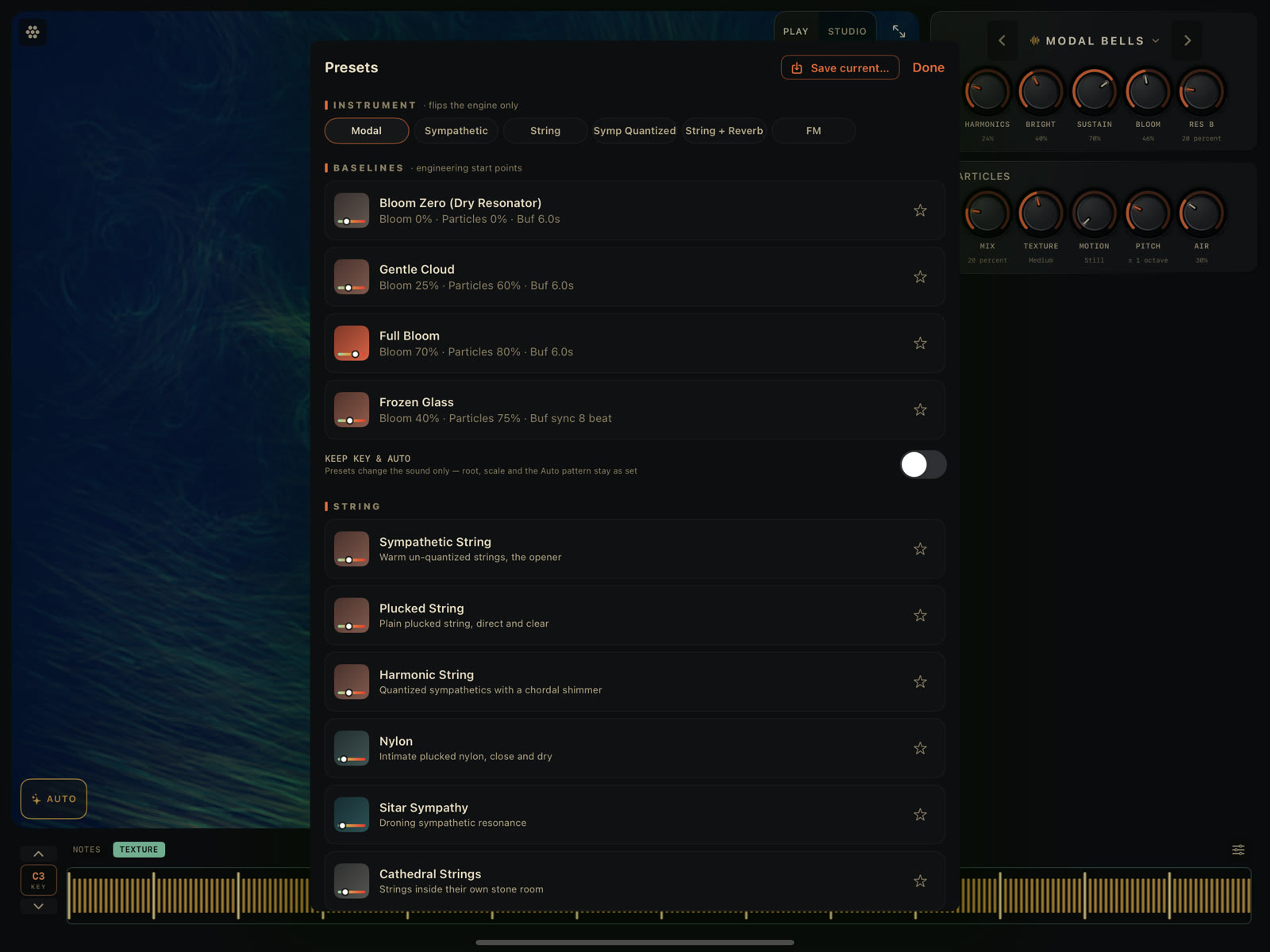
Particle Chimes calls a saved setup a sound, not a preset. One sheet handles browsing, loading, saving, and favoriting all of them, and it's the same sheet in Play and Studio. Open it from the sound-name stepper in Play, or the ‹ Presets › button in Studio's top bar (iPad) or visual cluster (iPhone).
What's in the sheet
Top to bottom:
- A Save current… button, which expands into a name field inline.
- INSTRUMENT chips: six resonator models (Modal, Sympathetic, String, Sympathetic (Quantized), String + Reverb, FM Voice). Tapping one switches the resonator's underlying model and changes nothing else about the sound. The sound's displayed name becomes that model's name.
- FAVORITES: everything you've starred, from any of the sections below. Hidden entirely until you've starred something.
- BASELINES, Studio only. Four fixed engineering starting points (Bloom Zero / Dry Resonator, Gentle Cloud, Full Bloom, Frozen Glass), each shown with a subtitle of its raw values.
- A KEEP KEY & AUTO toggle, off by default. Turn it on and loading a curated sound below no longer resets your current root, scale, or AUTO pattern; only the sound itself changes. User sounds never carry key information either way, so this toggle doesn't affect them.
- The curated library, 39 sounds grouped into Getting Started (six openers pulled from further down the list, so a new sound only needs one stop to see the instrument's range: Modal Bells, Sympathetic String, Velvet Voice, Kalimba, Chime Halo, Cathedral), String, Bells & Mallets, Voices & Organs, four groups added in 1.1 (Slow Time, Choirs & Ensembles, Loops & Echoes, Grain Gardens), and a six-rung Calm ↔ Chaos ladder (Bare Strum → Glass Bells → Chime Halo → Slow Bloom → Cathedral → Runaway Chorus) that runs from restrained to unhinged.
- YOURS: anything you've saved yourself.
Loading a sound
Tap any row to load it. The sheet closes.
A note on 1.1 and older sounds
As of 1.1, each resonator voice strikes with its own envelope; before, every voice shared one strike path. This reaches every preset and every saved sound, because they all go through the resonator's exciter. Nothing about a saved sound is lost or changed: every knob, head, scale, and tuning value loads exactly as you saved it. The difference is only in how the engine renders those values into sound.
Saving your own sound
Tap Save current…, type a name, and tap Save (it stays disabled until you type something). Saving under a name that already exists overwrites it without asking. There's no confirmation prompt, so double-check the name before you save over something.
User sounds live as individual files on the device. There's currently no way to rename one after the fact: delete it and re-save under a new name. That starts a fresh favorite star, since the old one was tied to the old name.
Deleting
User sounds show a trash icon on their row. Deleting one removes it from the list and doesn't interrupt whatever's currently playing, even if it's the sound you just deleted.
Favorites
Tap the star on any row (instrument, curated, baseline, or user) to favorite it. The star is its own tap target, separate from the row itself, so starring something doesn't load it. A favorited sound shows up twice: once in the FAVORITES section at the top, and once in its normal home section further down, star filled in both places.
Favorites are shared between the standalone app and the AUv3 plugin. Star something in one and it shows up starred in the other; both read from the same on-device storage.
Visualizer skins can be favorited the same way, from the skin picker, not this sheet. See Visualizers.