Panel at a glance
Each picture below is the desktop standalone app, with numbers on the controls. Find the control in the picture, then read the entry with the same number underneath. Click or tap a number to jump to its entry. The entries link to the guide pages that go deeper.
The face and back panel have the same controls on iPhone and iPad. Only the license and window handling are desktop things. Control names in capitals match the labels printed on the pedal.
Front panel
The face in TREM, the mode Bent Spool opens in. Everything on it is there in every mode.
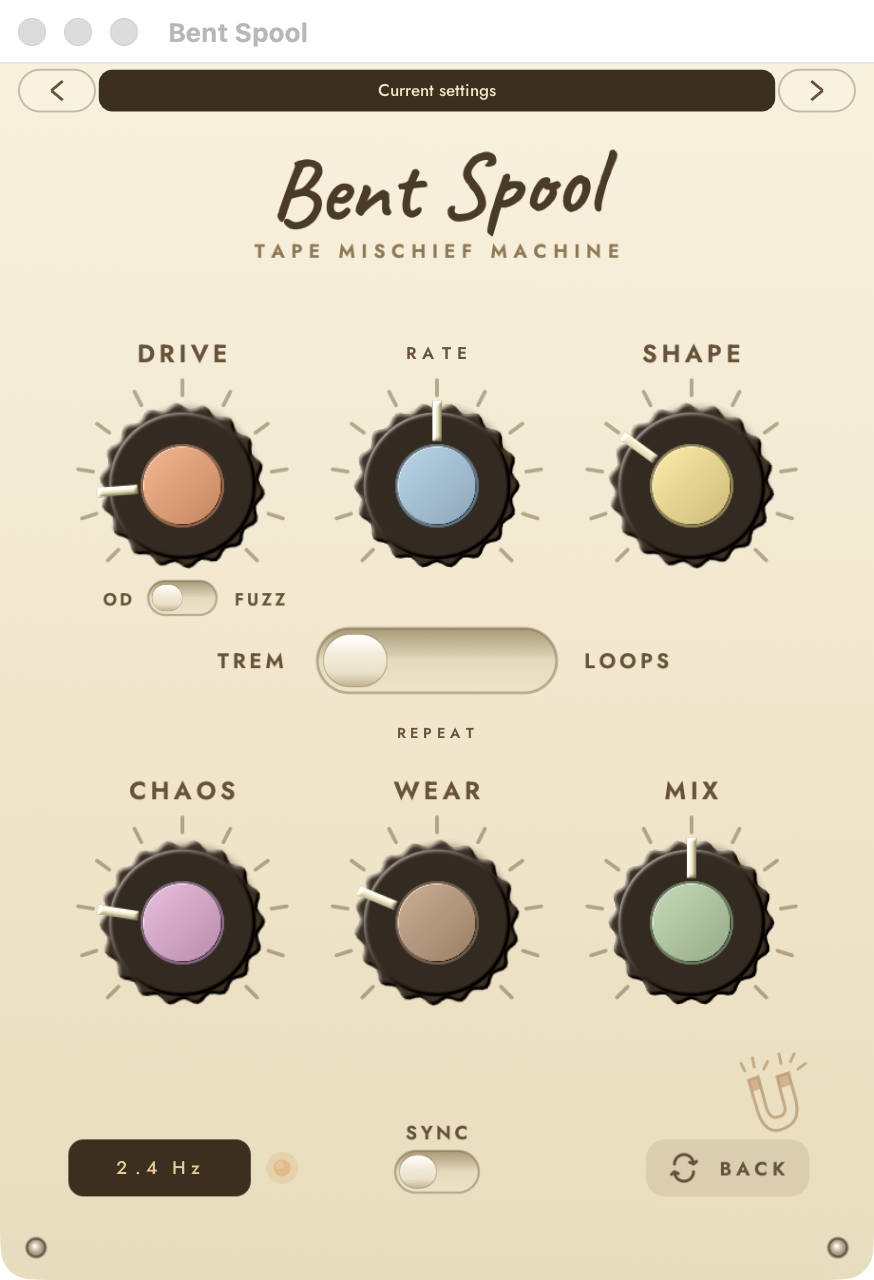
Preset strip. The dark bar shows the current preset name, and the arrows on either side step through the factory presets. It is on both sides of the pedal. See Presets.
DRIVE. Input distortion, 0 to 100%, default 15%. You hear it at every MIX setting. See DRIVE, OD and FUZZ.
Centre knob. Its label and range follow the mode: RATE in TREM, TIME in REPEAT, LENGTH in LOOPS. With SYNC on it steps through note lengths instead. See The centre knob.
SHAPE. Default 30%. In TREM it picks the tremolo waveform, in REPEAT the pitch of the copies, in LOOPS the spread of the loop voices. See TREM, REPEAT and LOOPS.
Mode switch. TREM on the left, REPEAT in the middle, LOOPS on the right. Click a position to jump straight to it. See The face.
CHAOS. Default 20%. Adds randomness that suits the active mode. At 0 nothing random happens. See CHAOS.
WEAR. Default 25%. Blends in tape wear after the mode. The back panel sets what the wear is made of. See WEAR.
MIX. Default 50%. Blends the dry signal with the processed signal. See Signal flow.
Readout. Shows the value of the centre knob: a frequency in TREM, a time in REPEAT and LOOPS, or a note length when SYNC is on.
Lamp. Gets brighter as CHAOS goes up. It is only a light and does nothing else. See CHAOS.
SYNC. Left is free, right follows the host tempo. With SYNC on the centre knob steps through note lengths. See With SYNC on.
BACK. Flips the pedal over to the back panel. The small magnet drawing above it is decoration.
Controls that change with the mode
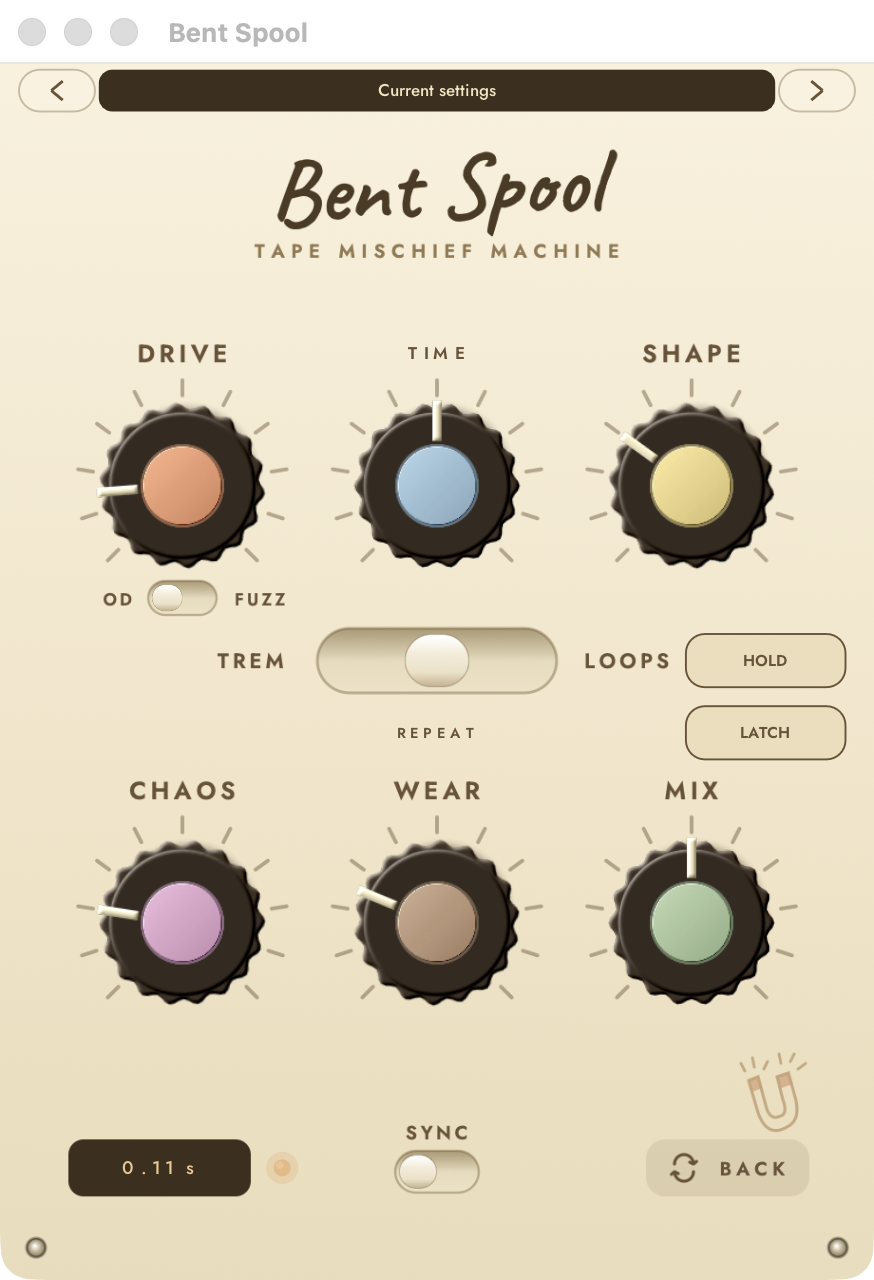
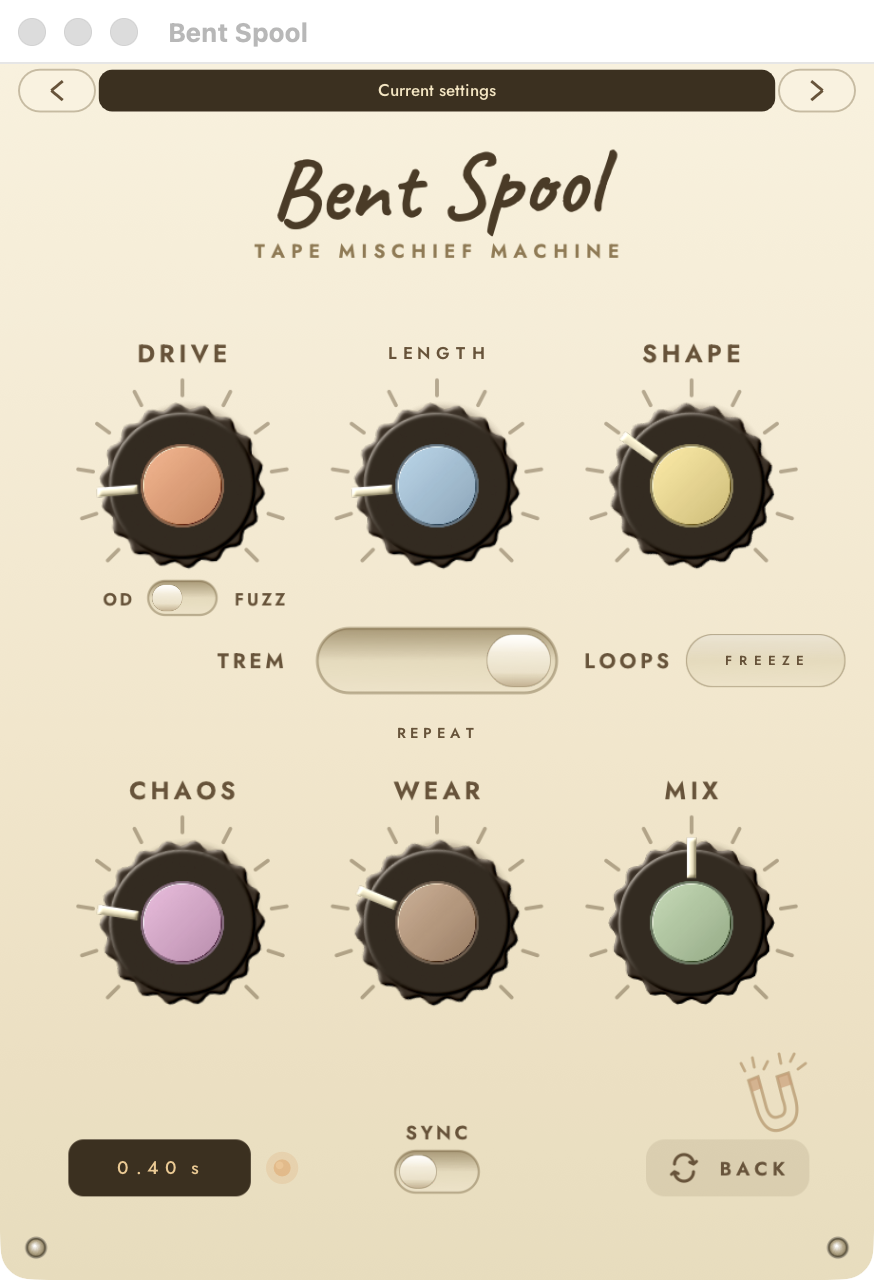
Two parts of the face change when you move the mode switch. The centre knob (4) takes a new label and range. A button appears beside the mode switch in REPEAT and in LOOPS. TREM shows no button. The number 4 on these pictures is the same centre knob as above.
REPEAT
In REPEAT the centre knob reads TIME, and HOLD and LATCH appear on the right.
LOOPS
In LOOPS the centre knob reads LENGTH, and FREEZE appears on the right.
HOLD. Appears in REPEAT only. Captures the last TIME-length phrase and loops it for as long as you hold the button down. See HOLD and LATCH.
LATCH. Appears in REPEAT only. The same capture as HOLD, but it toggles: press once to capture, again to release. See HOLD and LATCH.
FREEZE. Appears in LOOPS only. Stops recording and keeps the voices cycling through the held buffer. Press again to resume. See FREEZE.
Back panel
Press BACK (13) to turn the pedal over. Its title reads the fiddly bits. It holds the settings for each mode, the WEAR recipe, LEVEL and the CHAOS seed. Every mode's controls are always shown, and each one only affects its own mode. The preset strip (1) is on this side too.
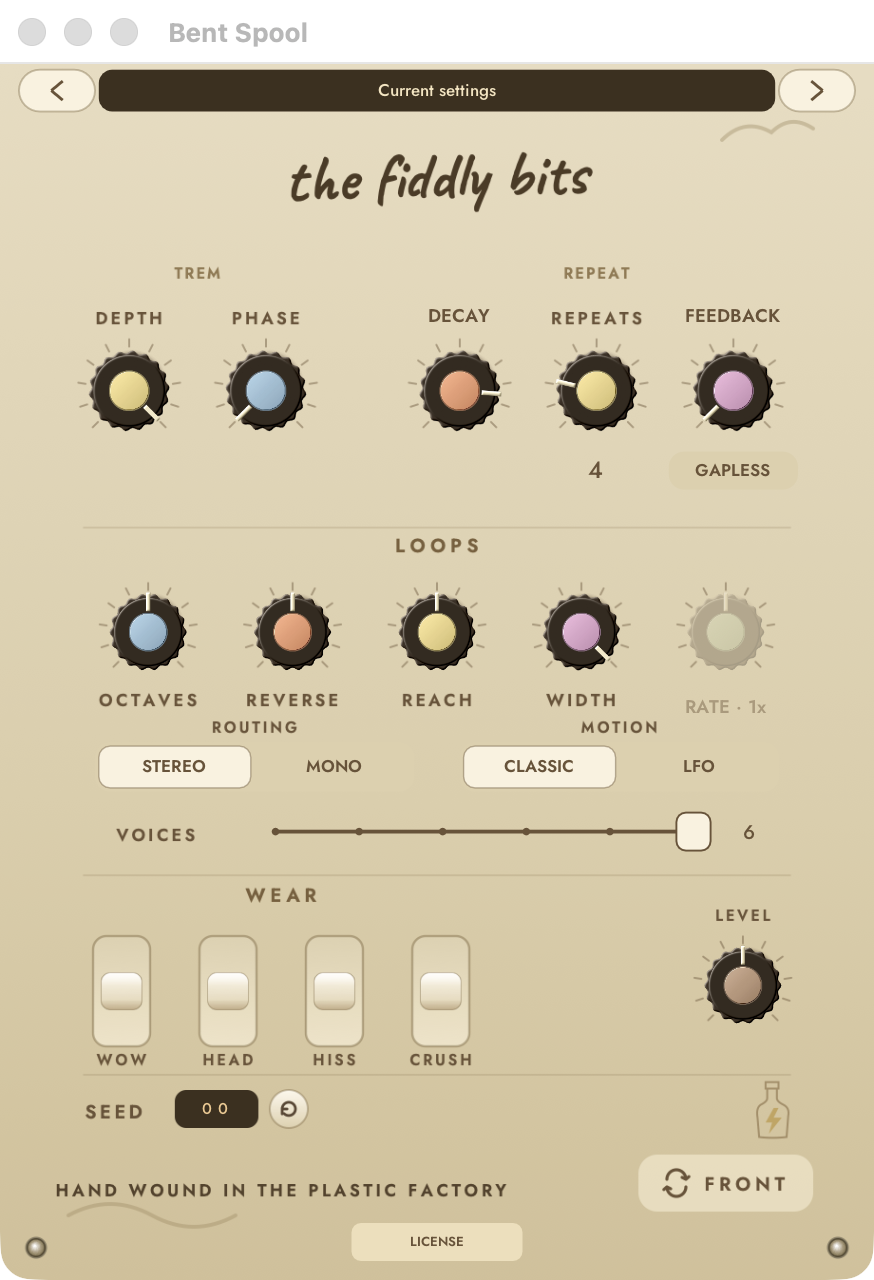
DEPTH. Tremolo only. How far the volume dips, 0 to 100%, default 100%. At 0 there is no tremolo. See DEPTH.
PHASE. Tremolo only. Offsets the right channel's pulse from the left, 0 to 180 degrees. At 180 the two sides alternate. See PHASE.
DECAY. REPEAT only. How much quieter each copy is than the one before, 0 to 100%, default 85%. See REPEAT.
REPEATS. REPEAT only. The number of copies, 1 to 64, default 4. The count is printed under the knob. See REPEAT.
FEEDBACK. REPEAT only. Regenerates the first copy back into the effect, 0 to 95%, default 0. See REPEAT.
GAPLESS. REPEAT only. For pitched-up copies, lets playback run on into the following audio instead of stopping short. Off by default. See GAPLESS.
OCTAVES. LOOPS only. Scales how far the voices spread in octaves, 0 to 100%, default 50%. The DIRECTION switch below it picks both ways, up only or down only. See LOOPS.
REVERSE. LOOPS only. Scales how many voices play backwards, default 50%. See LOOPS.
REACH. LOOPS only. Scales how far back in time the voices read, default 50%. See LOOPS.
WIDTH. LOOPS only. Scales the stereo spread of the voices, default 100%. See LOOPS.
RATE. LOOPS only. Speed of the voice motion, 0.25x to 8x, with 1x at noon. The knob and its label are greyed out unless the mode is LOOPS. See MOTION.
ROUTING. LOOPS only. STEREO or MONO. Click the left half for STEREO, the right half for MONO. Default STEREO. See LOOPS.
MOTION. LOOPS only. CLASSIC or LFO. Click the left half for CLASSIC, the right half for LFO. Default CLASSIC. See MOTION.
VOICES. LOOPS only. The number of loop voices, 1 to 6, default 6. See VOICES.
WOW. WEAR paddle, 0 to 100%, starts at 50%. Tape speed wobble. See The paddles.
HEAD. WEAR paddle. Tape head frequency response. See The paddles.
HISS. WEAR paddle. Tape hiss and dropouts. See The paddles.
CRUSH. WEAR paddle. Bit and sample-rate crush. The four paddles set the recipe that the WEAR knob on the face blends. See The paddles.
LEVEL. Output trim for the processed signal only, -12 to +12 dB, default 0. The dry signal is not changed. See Output and seed.
SEED readout. The current CHAOS seed, 00 to 99. Every random choice in the pedal comes from it. See Seed.
SEED button. Adds 1 to the seed and wraps from 99 to 00. There is no button to step down. See Seed.
FRONT. Flips back to the face. A new copy of Bent Spool always opens on the face. The bottle drawing above it is decoration.
LICENSE. Desktop only. Opens the license window. See Desktop license and demo.
For the full list of host parameters, ranges and defaults, see Parameters.